A source you can recover
Preserve identity and access details rather than depending on a highlighted file.
Turn a source library into chapter evidence. Keep the location, the qualification and the question you still need to check.
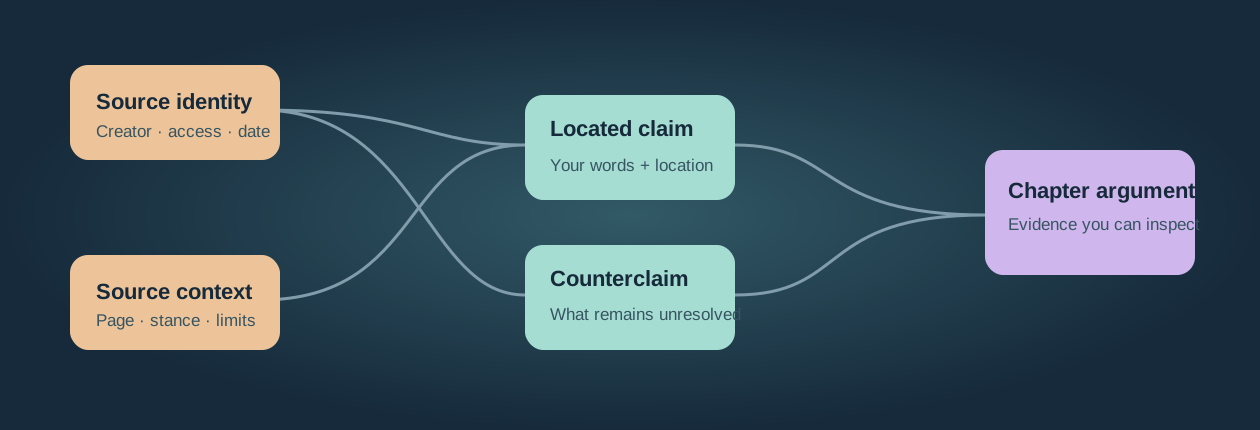
The useful unit is a readable claim with a source, a location and a reason it belongs in the book. The desk makes those links inspectable.
Preserve identity and access details rather than depending on a highlighted file.
Keep your paraphrase, a quotation and the author's position distinct.
Gather the evidence, expose gaps and revise the argument before a full rewrite.
This controllable explanation uses invented workshop records. It illustrates the method; it does not change, approve or verify your desk inputs.
S01 · Fictional committee notebook, spring 1908. Creator: Dock Room committee. Location: Illustration collection / Box A / Notebook 2.
Keep title, creator and access context. The next task is reading the relevant pages, rather than promoting this record automatically.
The invented page-12 entry says: “The public opening waits upon delivery of the room key.” A nearby letter describes people using the room later.
Reading identifies a useful question, but an isolated highlight does not yet express what the material contributes to the argument.
C01: The committee recorded a postponement of the public opening while it waited for a key. Source: S01, page 12.
Stance: the committee reports its own scheduling decision. Uncertainty: this does not date informal use of the room. Verification remains Unchecked.
CH02 · The opening that happened twice. Pair the committee claim with C02 from the letter, and inspect whether the dates refer to different events.
A chapter view exposes the disagreement. Return to both originals before turning that possibility into a factual manuscript assertion.
Use a stable source ID or citation key plus an exact page, timestamp or archive locator. Keep source metadata in the reference record and attribution beside the individual claim. Moving a highlight into a note does not verify its meaning.
Place C01 and C02 together to examine the two opening dates. Preserve their distinct perspectives and allow provisional placement in several chapters. The desk assembles entered claims; the writer decides what argument they support.
Reopen the originals before asserting the chapter’s explanation. Export a full-source JSON backup and all-chapter Markdown, then test the citation-manager handoff in the manuscript format you actually deliver.
Record enough metadata and access context to recover the material.
Understand the relevant passage and whose position it represents.
Write the individual claim, its location and the uncertainty you must preserve.
Gather the chapter's evidence and revise its argument when the material calls for it.
Primary documentation checked October 7, 2026. Tool features and access terms can change.
A source library answers “Where did I find this?” A chapter plan answers “What am I trying to establish?” Keep both, and connect them through small, readable claim records. A well-named folder can recover a document, but it does not explain why a particular paragraph matters to the book you are writing.
The evidence desk below helps you connect entered sources, claims and chapters, search the actual note text, and inspect missing references or competing dates. It does not open your cited documents, determine whether a claim is true or generate a scholarly bibliography. Its counts and flags describe your records; source access, attribution and final verification remain human tasks.
The method is useful for researched nonfiction, memoir with external evidence, narrative history and other projects that need a recoverable route back to material. Adapt it to the work. An exploratory notebook and a publication-ready reference have different obligations. Avoid turning research organisation into a new project that consumes the time reserved for writing.
Use Captured, Read, Extracted and Placed as a working vocabulary. A source can be partly read, partly extracted, irrelevant or waiting for permission, so retain an explanatory note when one label cannot express its condition. The state is an assertion made by the researcher; software should not silently promote it because a checkbox or a note exists.
Captured means there is enough identity and context to recover the source. Record creator, title, date or year when known, type and a location such as an archive reference, DOI, stable URL or local file reference. Distinguish a bibliographic record from an unattached PDF with an ambiguous filename. Record unknown metadata honestly instead of filling it with guesses.
Read means you have examined the relevant material and can describe its scope. Record which portion you read when a source is long. A growing read-but-unextracted queue is a useful prompt to review the work, but it is not a validated universal predictor that a book will fail. Some reading legitimately informs orientation without becoming a quoted or cited claim.
Extracted means useful material has become individual notes in your own words, with recoverable source locations. Include qualifications, the speaker or author's position and your response. Extraction is selective: a source may yield several claims, none at all, or a decision that it does not belong in the project. Record that decision so a later reader does not mistake an empty set of notes for lost work.
Placed means the relevant claims have a provisional home in a chapter or section. Placement can change when the argument develops. Give a claim more than one possible chapter where that helps, and keep an unassigned queue visible. A source marked Placed without any attached claim deserves inspection; the label alone does not prove the bridge exists.
Review the queue often enough to retain useful context. A weekly extraction appointment is one practical example, rather than a scientific memory deadline. The tool's age flag uses your entered reading date, reference date and chosen threshold. It does not measure actual reading or decide what pace is appropriate for you.
Write one assertion that can be understood without reopening the notebook. Attach the source ID, page, section, timestamp or archival location. Keep a short quotation when useful, clearly separated from your paraphrase, and retain enough context to check the interpretation. A quotation records wording; the paraphrase records the decision you made about its meaning.
Add the probable chapter, a few useful tags and an attribution or stance note. Did the author endorse the assertion, report another person's view, pose a question or reject an argument? Record disagreement, uncertainty and evidence you would need to resolve them. A note saying only “the author says X” can turn a reported or rejected argument into an apparent endorsement.
Avoid treating an entire book summary as a single movable claim. One source may support several chapter arguments, while one chapter may draw on several sources. Keep the source metadata in one reference record and give the claim a link back to it. A stable source ID works even when a citation-key plugin or particular reference-manager scheme is unavailable.
This example is fictional and illustrates the fields rather than supplying historical evidence. The project concerns a small community workshop. Its invented source is Committee notebook, spring 1908, attributed to the fictional Dock Room committee, with archive reference “Illustration collection / Box A / Notebook 2.”
A weak note would say “The workshop opened on May 12.” The written claim preserves the postponement and its limited perspective. That difference affects the chapter's argument. The downloadable fictional desk example retains this record, the competing letter, a third attribution example, chapters, dated events, names and places in the actual restore format.
Write each chapter's working question or argument, then gather the relevant claims. A chapter list can expose missing support and repetition much earlier than a full prose draft. Counts help you locate a decision, but four claims do not automatically make a chapter weak and ninety do not automatically require two chapters. Length, independence, relevance and the type of evidence matter.
Keep provisional placements cheap to change. A claim that fits nowhere may be irrelevant, may need a better paraphrase, or may reveal a subject your original outline missed. Read an unassigned set together before discarding it. Treat the structure as a hypothesis about the book, rather than a folder tree every future observation must obey.
Draft from the chapter's claims, then reopen the original material whenever context, wording or verification requires it. The claim layer reduces unnecessary searching; it does not licence writing without returning to sources. Retain contradictions and limitations beside supportive material so the draft does not become a summary of only the passages you agreed with.
The desk supports several chapter IDs per claim, an exact chapter filter and searchable text. It reports references to missing source or chapter records while preserving the entered claim. It does not invent a chapter assignment, delete an inconvenient contradiction or judge whether enough independent evidence supports an argument.
Record dated events separately from claim prose, with the source ID and exact location for each entry. Keep the precision and uncertainty of the source: a recollected month is not an exact day. Use a note or an undated entry when you cannot support a full date. Preserve alternative dates rather than silently selecting the one that makes the narrative smoother.
In the fictional example, one entry refers to the key issue on May 12, while a letter mentions people using the room on May 14. They share an “opening” conflict group, but they may describe different events. The timeline flags the entered date difference; the researcher must inspect the wording and decide whether this is a contradiction, an informal opening or an error. A timeline makes the question easier to see, not automatically easier to answer.
Keep each person, preferred spelling, aliases, role, period of appearance and source location in a compact register. For example, the fictional Mira Fenn appears as the writer of the May 14, 1908 letter; that record does not establish her role in earlier committee decisions. A date or period can live in the role note, or in an added CSV column that the desk preserves on export and restore. An initialled signature and a full name may belong to the same person, but do not merge them merely because they look similar. Record the evidence for identity and distinguish people with the same name. The list helps maintain manuscript consistency and gives a copy editor something more durable than memory.
Record locations and their relevant historical context. A building's name, ownership, function or boundaries may change over the period covered. Preserve the context that applies to the event being discussed instead of using only its current name. A table is often enough; elaborate mapping is unnecessary unless spatial relationships matter to the argument.
Build these registers during reading and extraction, when source locations are readily available. A spreadsheet can be a perfectly useful home for them. They remain related records, rather than replacements for the claim layer or the bibliography.
Consider a fictional research plan for a book about the workshop and its community. The final reference register has eighty sources: sixty-two published works, ten interviews and eight archival documents located during two archive visits. These quantities illustrate a manageable plan; they are not recommended universal totals.
Months 1–4: read and extract together. The researcher examines twenty-four published sources. Across seventy-five extraction sessions, an assumed four usable claims per session produces three hundred claims. Some sources contribute many claims and others contribute few. A review before starting another large source keeps unresolved extraction decisions visible instead of assuming reading faster is the solution.
Month 5: read the proposed chapters as evidence lists. One chapter contains seventy-five claims, another contains nine, and twenty-four claims remain unassigned. Those three groups account for 108 of the 300 claims; the other 192 sit in other chapters. The writer reviews relevance and duplication before deciding whether to split, narrow or combine anything. The unassigned set suggests a section about access to the room, an angle absent from the first outline.
Months 6–11: interviews and archives. The remaining thirty-eight published sources, ten interviews and eight archival documents bring the register to eighty sources. Immediate rough extraction after an archive visit is followed by a careful check of references and wording. Interviews retain transcript timestamps and recording identity. The entered timeline exposes two different dates associated with an opening; it does not decide which source wins.
Months 12–16: draft and revisit context. The claim layer has grown to an illustrative 720 notes. Chapters are drafted from their current argument and selected claims. The writer records why a source had to be reopened: missing context, quotation checking or a changed interpretation. A frequent need to reconstruct context suggests improving extraction; no fixed reopen percentage proves the system is good or bad.
Month 17: check the manuscript against originals. Every factual assertion is checked against the source and location that supports it. In this invented project, the review finds an omitted qualifier, a transposed date and an argument attributed to someone who was actually rejecting it. The fixes update both the manuscript and the associated claim notes. The time required depends on the manuscript, access and evidence, rather than a promised one-day or nine-day pass.
Month 18: finish references and delivery. The writer validates citation metadata, the publisher's requested style and the final bibliography, then checks the compiled manuscript and backups. A reference manager can reduce formatting work, but the writer still reviews missing fields and unusual archival or interview references. The result is a recoverable route from the submitted assertion to its evidence.
Narrow the coverage to the question the book can responsibly answer. Read fewer sources deeply where appropriate, rather than collecting an unreviewed mountain and hoping it will become a draft. A coarser note covering one passage can be useful when time is limited, provided it retains the exact location, qualification and attribution needed to revisit it.
Drop elaborate cross-linking or decorative dashboards before dropping source identity and locations. Keep a chapter or unassigned field so the work remains gatherable. Maintain a list of assertions that still need checking, and narrow or remove a claim when its evidence cannot be verified by the deadline. A shorter argument can be responsible; an unsupported statement is not repaired by a larger bibliography.
Use a representative handoff to choose software: capture one source, write a complete claim, assign it to a chapter, recover the original and export the work. The simple system that survives this test is preferable to a sophisticated configuration that prevents you from doing the next extraction session.
These comparisons describe supported workflows and important boundaries. They are not an uptime study, a measured performance ranking or a claim that every writer needs the same brands. Official documentation was checked October 7, 2026; features, plans and licensing conditions can change.
Zotero provides source capture and metadata, attachments, group libraries and citation workflows. Its word-processor documentation describes integrations for Word, LibreOffice and Google Docs with updating bibliographies. A dedicated reference manager is particularly helpful when the manuscript contains substantial endnotes or a bibliography, including non-academic work.
Its PDF reader documentation describes annotations added to notes with PDF-page links and citations. “Show on Page” returns an annotation to its context. When sharing with another PDF reader, export embedded annotations rather than assuming database-only marks travel with the file. Those notes can contribute to the claim layer; the important distinction is the structure of your evidence, not a categorical ban on keeping thoughts in Zotero. Validate captured creator, date and item type. A saved PDF does not guarantee correct metadata or that you have interpreted it accurately.
Obsidian stores notes as local Markdown files and supports links between them. A claim can carry source identity, chapter and tags, while links connect related or conflicting ideas. Keep configuration modest and establish a real backup; file ownership alone does not prevent loss. Ordinary Markdown can also be edited outside Obsidian, with application-specific conveniences treated separately.
The current official pricing makes the base app free, including commercial use; Sync and Publish are optional paid services. A commercial support licence is optional, rather than a compulsory fee for work. Its native Bases core plugin can view, edit, sort and filter note properties in database-like views. For example, chapter and verification properties can expose a review queue without requiring a third-party database plugin. Citation bridges may still need additional setup; confirm how the intended integration links to your reference library before relying on it for final citations.
Notion's database documentation describes pages with properties and multiple views. Use source ID, chapter, tags, state and a meaningful note body so a collaborator can inspect the same evidence. Relations and filtered views can make chapter assembly convenient, but a database is not itself a scholarly citation engine.
Its current offline guidance supports downloaded pages in desktop and mobile apps, including on free plans. It does not provide this mode in a web browser. Downloading a database includes the first fifty rows of its first view; additional important rows and subpages need separate attention. Test a representative archive-day workflow on the actual device. Keep exports and permissions deliberate instead of assuming offline support means the whole research library is always present.
Scrivener's official overview describes a manuscript binder, reference material beside writing, a corkboard and compilation into formats such as Word, PDF and plain text. Use a chapter's argument and selected claims to guide drafting, and retain accessible links back to the underlying reference record.
Its internal-link guidance and project-bookmark explanation document links and bookmarks, so “no linking” is an inaccurate reason to reject it. Test the citation and bibliography handoff you intend to use after compilation; do not confuse footnote support with a full reference-manager integration. One documented alternative is Zotero's RTF Scan: a compatible RTF manuscript can contain supported citation markers, which the scan maps to library items before creating a formatted output. Resolve ambiguous matches and review the output; a handwritten source key is not automatically an active citation. Keeping a large research folder is useful only if the evidence can still be gathered by claim and chapter.
DEVONthink serves document-heavy workflows on Mac with companion access on iPad and iPhone. Its edition comparison distinguishes capabilities, including scanner/OCR functions in Pro and Server. Search, classification, related-item suggestions and annotations can help retrieve material, but do not decide what a document proves.
Choose it when the actual corpus and retrieval needs justify the extra setup, rather than applying a universal threshold of a thousand sources. Its current licensing explanation includes one year of updates with a licence; continued update eligibility and companion terms deserve attention. Its Vision/OCR explanation distinguishes text held in a local index from an OCR text layer embedded in an exported PDF. If a collaborator must search the shared document, check the exported file rather than assuming a successful local search proves portability. OCR output and suggested relationships still require checking against the image and context.
Storyflow's canvas is a possible workspace for grouping extracted material, testing sequences and discussing an outline. Its book-research explanation describes AI context from the current board plus up to one Tactic and three explicitly mentioned documents. Inspect the context actually attached; do not assume a model can see every source in a library.
That explanation also distinguishes its structural role from citation management, bibliography generation, PDF annotation and a large filtered claim database. Keep a separate recoverable reference workflow. Check current access and pricing; paid early access is different from a proposed future free plan, and an invited collaborator's conditions are not automatically the owner's plan.
Plain Markdown in an ordinary editor can hold complete claim notes. A spreadsheet can handle the timeline, cast and places registers, or a modest claim table. A reference manager and an existing word processor may be enough for a simpler project. The recommendation is to preserve the source-to-claim-to-draft handoffs; a particular three-app stack is an option, not a universal requirement.
| Tool | Recovering sources and quotations | Assembling claims and chapters | Draft and delivery decision |
|---|---|---|---|
| Zotero | Connector capture, bibliographic items, attachments and PDF annotations; inspect imported metadata | Notes can retain claims and annotation links, but organise the argument deliberately rather than relying on a library folder | Word, LibreOffice or Google Docs citations and updating bibliography; compatible RTF Scan is a separate reviewed handoff |
| Obsidian | Local Markdown can point to a source or file; it does not independently validate bibliographic metadata | Links, note properties and Bases views can group claims by chapter and review state | Portable text is useful for handoff; test any citation plugin and attachment references separately |
| Notion | Source and location properties can accompany a claim page; scholarly references need a separate workflow | Shared database views and permissions suit co-authored work; plan downloaded pages before travelling offline | Export and inspect the content; database relations or a displayed reference are not automatically active manuscript citations |
| Scrivener | Research material can sit beside the draft, with document links and bookmarks | Binder and corkboard help arrange sections; ensure individual evidence can still be gathered by argument | Compile the actual requested manuscript format and test the bibliography integration on that output |
| DEVONthink | Full-text retrieval, related-document suggestions and edition-dependent OCR help a document-heavy archive | Recover the relevant document, then make a located claim; a similarity suggestion is not proof of relevance | Test exported PDF text and annotations so local indexed text is not mistaken for portable OCR |
| Storyflow | Text and images can remain visible while an argument is arranged; this is not a citation/PDF-annotation library | Spatial clusters and sequences suit structural exploration; inspect the current board and explicitly supplied AI context | Keep the reference register and manuscript handoff recoverable outside the canvas |
For a concrete two-way handoff, preserve EXAMPLE-S01 in C01 rather than retyping a shortened reference into every note. Gather C01 and C02 for CH02, then carry their located claims into the chapter draft. When the manuscript uses an actual quotation, insert and review the citation through the reference workflow appropriate to that document. This local example key is an identifier, not a working Zotero field or fabricated bibliographic reference.
Zotero's capture documentation describes the browser Connector and adding bibliographic items and files. Capture a representative webpage, article and PDF, then inspect creator, date and item type rather than assuming the saved attachment filled every field correctly. Group libraries can support collaborators, while ownership, library permissions and attachment-storage allowances are separate choices. In Obsidian, internal links make related claims navigable; retain a plain-text source identifier as well so an exported note remains understandable without its original graph or plugin.
Count storage, device access, paid syncing, collaborators, plugins, OCR requirements and update rights alongside the base licence. Zotero separates the free application from optional paid storage. Obsidian separates the free base app from optional services. Notion costs depend on the intended workspace and collaboration needs. Scrivener's platform licence and future major upgrades require their current terms; do not assume a one-time purchase includes every future major version. DEVONthink's edition and update eligibility are separate decisions.
For a concrete price boundary checked October 7, 2026, Zotero storage includes 300 MB free, with 2 GB at $20 a year, 6 GB at $60 and unlimited storage at $120. Group attachment storage draws from the group owner's account. These are storage subscriptions, rather than a fee to use the local application. DEVONthink's pricing lists Standard at $99, Pro at $199 and Server at $499, with two Mac seats and one year of updates; mobile inclusion depends on edition and update eligibility. The licensed app remains usable when update time expires, so optional continued updates are a different cost from continued use.
Inspect official plan pages before budgeting, and note monthly versus annually billed rates, tax and who needs access. Trial the actual size and type of material you expect to use. This guide has not measured comparative performance or reliability; longevity, popularity and a vendor's superlative are insufficient evidence for a ranking. Test recoverable exports and backups, including whether attachments, metadata, citations and note links survive.
Work through the manuscript's factual statements, open the supporting source at the recorded location and verify wording, scope, attribution and date. A claim note is an index to the evidence, not the evidence itself. Confirm whether a quoted speaker was endorsed, criticised or merely reported. Recheck translations and transcriptions when the assertion depends on their wording.
Record the outcome, who checked it, the version or location used and any remaining issue in a review note. Update the manuscript and the claim layer together when an interpretation changes. The desk's verification field remains your entered assertion; a “Verified” label without a location is flagged because it leaves an incomplete audit trail, not because software has independently disproved the claim.
Source access and complexity affect how long this takes. Exact references reduce searching but do not guarantee a one-day check or a flawless book. Back up the reviewed draft and preserve enough context for a later correction, especially where archival access or interview availability may change.
Transcription, corpus search, candidate-source triage and provisional chapter suggestions can save work when the output remains reviewable. Check transcript names, omissions and timestamps against recordings. Inspect summaries before using them to decide a source is irrelevant, and confirm the actual document context supplied to a model.
AI-generated extraction can lose qualifiers, invent locations or attribute a rejected argument to an author. A suggested chapter can also have factual consequences if it encourages a misleading argument, so it is not automatically risk-free. Write or carefully revise the claim yourself, then verify it against the source. Treat a model's paraphrase as a draft to inspect rather than a remembered decision you actually made.
The desk uses MiniSearch for lexical search over your entered claim text and Cytoscape for real source/claim/chapter relationships. It performs no model inference, OCR, transcription or semantic truth assessment. A search result means text matched the query; it does not mean the source supports the assertion.
Export the full JSON backup for an exact restore of the entered desk and graph positions. Table CSV exports are intended for interchange and protect spreadsheet-formula-like cells; they do not preserve original CSV spacing. Markdown gives a readable chapter handoff and complete source tables. Manual local draft storage is a convenience on this browser, not a shared team system or the only backup of a book.
Download the fictional desk example Restore this file below to inspect its complete sources, claims, chapters, timeline, cast and places records.
PapaParse handles CSV, MiniSearch indexes the actual entered claim text and Cytoscape draws the real relationships. No document is uploaded or read. Verification and source states are assertions you enter.
Keep the required headers. IDs are unique within each table and remain text, including leading zeros. Source references use source IDs; multiple chapter IDs and tags can use semicolons. Put commas or line breaks inside quoted CSV cells. Extra CSV columns survive table export and full restore.
Dates use YYYY-MM-DD when supported by the source. Leave uncertain dates blank and explain their precision in the event or note. Separate records can share a conflict group to flag different entered dates. Names and aliases are not automatically merged. Missing source and chapter references remain visible and are retained.
Editing any source field invalidates the derived view until you rebuild. Search is lexical with prefix matching and all query terms; it performs no AI inference or truth assessment. A claim's chapter input updates the CSV record. JSON preserves raw source and graph positions; table CSV protects formula-like spreadsheet cells.
Enter your records, or load the fictional example.
Amber nodes are sources; mint nodes are claims; violet nodes are chapters. Arrows follow actual entered references. Drag nodes to arrange them; the full JSON backup preserves those positions. The list below retains the complete claim labels and locations.
Known full dates are sorted; undated records remain visible afterwards. A conflict flag does not choose a correct date.
Save manually on this browser. This is not shared storage or your book's only backup; keep a separate JSON file you control.
Separate recoverable references, individual claims and the manuscript. Zotero, Obsidian or Notion, and Scrivener are options for those jobs, but the practical handoffs matter more than a mandatory three-brand stack. Test source recovery, chapter assembly and export with your actual project.
Sources arrive grouped by document, while a chapter needs material grouped by its argument. Small claim records with locations bridge those shapes. Collection is still useful, but a folder of highlights does not explain how each passage supports the book.
It means turning relevant material into separate readable claims in your own words, each linked to its source and exact location. Preserve qualification, attribution, disagreement and probable chapter so the interpretation can be checked later.
Keep source identity in the reference record and create individual claim notes where ideas need to be assembled across chapters. A source can contribute several claims to different arguments. You can retain source summaries alongside this layer without treating them as a substitute.
They preserve wording but may lose why you found it useful. Add your paraphrase, its qualification and your response, while retaining a relevant quotation and exact location. Reopen the surrounding passage before relying on the interpretation.
There is no universal target. The worked example illustrates 720 notes from eighty sources, including interviews and archive material. Relevance, independence and usable source locations matter more than achieving a particular total.
Yes, especially when endnotes or a bibliography must remain consistent across revisions. Zotero is one option for capture and manuscript citations. The tool does not guarantee metadata quality or interpretation, and a particular brand is not compulsory for every book.
Consider local Markdown and linking in Obsidian, or shared database views and collaboration in Notion. Confirm the actual export, backup, permissions and offline workflow you need. Neither choice removes the need for a reliable reference and citation handoff.
It can keep reference material near the manuscript, arrange sections and provide document links. Make sure claims can still be gathered by argument rather than remaining only in source folders. Test the bibliography workflow after compilation.
Give it a provisional placement when useful and keep an unassigned queue visible. Inspect the chapter's argument and evidence rather than using a fixed count as proof of adequacy. Reassign, split or discard after reviewing context and relevance.
A sourced timeline, a cast list with names and aliases, and a places index with relevant historical context can help. Preserve uncertain or competing dates and identities rather than silently reconciling them.
Use the notes to find the original, then check each factual manuscript assertion against that source and location. Inspect scope, wording, date and author position; update both the claim record and manuscript when an interpretation changes.
Watch for collecting without deciding what material contributes to the argument, or storing every useful idea only inside a source summary. Keep recoverable references and readable claims, and inspect unresolved extraction without assuming a universal cause of stalled writing.
Choose a cadence that retains context and fits your reading. A weekly review is one practical example rather than a proven memory deadline. The desk flags entered reading dates using your own reference date and age threshold.
Yes. State what you question, why, and what evidence could resolve it. Distinguish your response from the author's stance; a reported or rejected view should not become an apparent endorsement in the manuscript.
It can draft notes, but those drafts need source checks for missing qualifiers, attribution mistakes and invented locations. Write or carefully revise the claim yourself and inspect the surrounding material. This desk performs no AI extraction or document reading.
Transcription, triage, retrieval and provisional classification can be useful when reviewable. Check recordings, supplied context and the consequences of a suggested chapter. A search match or fluent summary is not evidence that a source supports a claim.
Narrow the coverage, use coarser but located notes where appropriate and remove optional linking or dashboards. Keep source identity, exact locations, chapter or unassigned status and a factual-check list. Narrow unsupported claims rather than presenting them as established.
Plan an interview and distinguish sourced responses from interpretations.
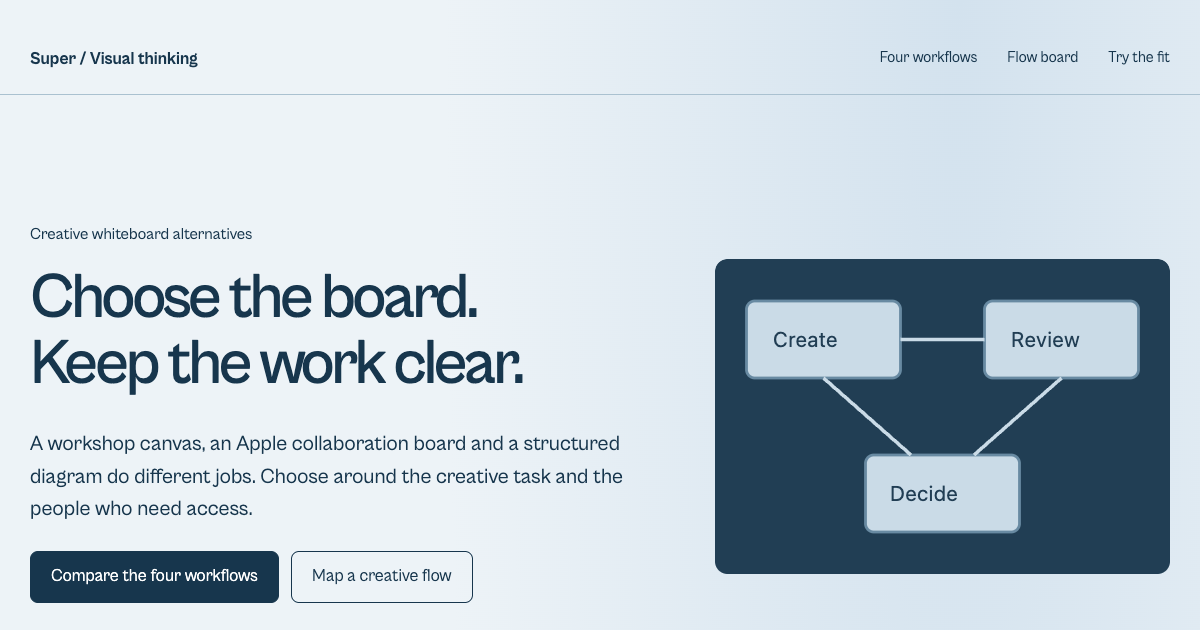
Explore visual arrangements and relationships before fixing the chapter order.
Inspect document ownership, versions and handoff records for a media project.
Start with the job you need to trust. Zotero can hold references and manuscript citations; Obsidian can hold local claim files; Notion can support shared claim records; Scrivener can hold the manuscript; DEVONthink can retrieve a document-heavy archive. These are candidates for different responsibilities, rather than a measured trust ranking. Test one real source and claim through capture, retrieval, chapter assembly and export before committing a whole book.
Separate the base application from storage and sharing. Zotero storage lists 300 MB free and 2 GB at $20 a year; the group owner's allowance supplies group attachment storage. Obsidian's base app is free, including commercial use, while its listed Sync option is $4 per user per month billed annually or $5 billed monthly. That is $48 versus $60 over twelve months for one user, before tax, and Sync is optional. Inspect each paid tool's platform, collaborator and update terms against your own handoff rather than treating “one-time” as a promise of every future upgrade. Prices checked October 7, 2026.
This guide has no comparative uptime or performance measurements. Run an export and restore with your actual attachments, citations and chapter notes. Confirm that a source link reopens its precise location after the move, and that a backup contains the needed files. For a concrete trial, transfer C01 with S01 and page 12, recover the passage, then check that CH02 still includes the competing letter. A familiar brand name does not prove that particular route survived.
Identify the failed handoff before purchasing. If references are inconsistent, establish a reference-manager workflow first. If you cannot gather evidence by chapter, trial a claim layer with an existing editor or database. If compiling the manuscript is the obstacle, test a drafting tool on one chapter. Buy archive retrieval or OCR capabilities when a representative document actually needs them. Keep tools you already own when they pass the same trial.
A plain Markdown editor can preserve complete located claims; a spreadsheet can maintain dates, names and places. Zotero can also serve a non-academic book that needs endnotes. These inexpensive options are useful when the evidence route remains clear. Add complexity only when it solves a concrete problem, such as shared review or recovering text from scanned documents.
The source article suggests Customer Persona, Documentary Research, Target Audience, Video Research, Destination Research and Second Brain boards. Their value depends on the question you put inside them. None substitutes for references, located claims or manuscript verification.
This 32-second silent walkthrough follows the fictional notebook already used in the desk. It shows what changes between capturing a source, reading its context, extracting a located claim and assigning a provisional chapter. Captions describe each decision; nothing in the example is historical evidence.
Try the same sequence in the editable desk: change a claim’s location or chapter, inspect the graph, and export the full JSON before restoring it. The video does not modify your entered research.