Client
One direction, understandable on a phone. Show the selected mood and the scope of the decision. Keep technical instructions on the crew board.
The client needs a clear direction. Your crew needs precise instructions. You need a reference that survives a location without signal. Choose the tool for the audience, then make every image mean one thing.
Milanote is a sensible starting point for a composed client presentation. PureRef is purpose-built for keeping a desktop reference visible beside capture or editing software. Are.na supports a growing research collection. Morpholio Board carries the product and material details an interiors stylist needs. Storyflow connects the visual direction with the surrounding brief and plan.
You can combine those roles without paying for every product. A controlled browser link, a department-specific document and a locally verified working reference often matter more than one elaborate canvas. These recommendations describe documented capabilities and practical fit; they are not a ranking based on independent commercial trials.
One direction, understandable on a phone. Show the selected mood and the scope of the decision. Keep technical instructions on the crew board.
Who must reproduce which detail? Name the light, garment, skin finish or expression; say what to ignore and which direction to avoid.
Find the needed detail beside the live capture. Reopen the actual downloaded images with the network off before leaving for location.
Use six checks before committing: client access, offline retrieval, collecting effort, readable image detail, precise annotation, and finding the material again next year. Test them on your own portrait commission, two-day interiors assignment and longer documentary project. A capability described in help documentation still deserves a real rehearsal on your device and recipient’s phone.
Web and mobile boards combine images, columns and notes. Read-only links can open without an account; editing invitations have different access requirements. The free account allows 100 notes, images or links and ten file uploads. Paid personal access is $12.50 monthly or $9.99 per month billed annually. Export before a location trip: the mobile apps currently require internet.
Windows, macOS and Linux support the reference workspace. Always-on-top behavior, embedded local images and a saved scene support shoot-day retrieval. Version 2 includes rich-text notes, comments, groups and hierarchy. Personal pay-what-you-want access is distinct from required commercial licenses; the current Small business option is a $49 version license, subject to the studio’s three-user limit.
Images, text, links and other content become blocks connected to channels. A reference can acquire several contexts without pretending each channel is a separate source. Guest access allows 200 total blocks; Premium is $7 monthly or $70 annually. Current exports and Premium presentation mode make blanket “cannot present” claims too broad. A curated client board still needs deliberate selection.
Use product links, exact finishes, cutouts, Ava lists and cut sheets when the reference needs to become an obtainable item. Current support includes iPad, iPhone and Mac, with feature and device differences. Saved visual content, live retailer pages, iCloud synchronization and current product stock are separate offline questions. Check the actual device and subscription rather than promising all functions offline.
A canvas can hold references alongside the documents explaining the job. Current creator documentation describes three Tactics, five documents and three boards of added context, whereas older material gives smaller limits. Use the actual account controls when primary pages disagree. It is a planning alternative, not a native always-on-top reference window or a product procurement system.
A magazine editor should understand the proposed visual direction without learning your workspace. Milanote’s useful combination is a controlled layout, short notes beside images and a browser presentation. It is not enough to send a link: choose the correct permissions, test it outside your own signed-in account and check the actual small-screen view. A clean layout is a starting point, not evidence that a client saw or approved anything.
Free’s 100-item allowance is account-wide, not a fresh allowance for every shoot; ten file uploads are another separate limit. A board of 24 images and six notes consumes at least thirty relevant items before adding anything else. Existing projects matter. At the paid personal rate, $12.50 for one month and $119.88 for an annual subscription are different commitments. Guest review should not be casually priced as a new paid editor. Plans, sharing permissions, presentation and export behavior explain those distinctions.
The trade-off is portability versus live collaboration. Milanote is convenient for maintaining a shared direction, but a current mobile board needs a connection. The mobile documentation explicitly says offline viewing and editing are not yet available. Keep the downloaded deliverable as a fallback rather than assuming a previously opened page will be usable underground.
A tethered photographer needs to compare the current frame with a reference without losing the capture window. PureRef’s floating window serves that working task directly. Arrange a small set for the current setup, zoom far enough to read the specific shadow or fabric texture, and place the window where it does not obscure exposure information or the client’s viewing area. A desktop application file is a poor default client delivery if the client does not use that application.
The source of an offline failure is often the file’s contents. PureRef embeds images in a saved scene by default, but settings can leave local images linked to external paths. A scene saved on your laptop may therefore open differently on a crew member’s laptop after files move. Save the actual scene, reopen it on the intended machine with the network off and check every required image. If a linked file is missing, relink it or deliberately embed the needed content before handing off. File size depends on the images; “one portable file” does not guarantee a tiny attachment.
Licensing is the important cost correction. The current download surface separates Personal use from Small business and Business. Personal access uses a contribution model; it is not a blanket free commercial license. Small business shows a one-time $49 license for version 2.x, with at most three users per studio; confirm the license count for the people using it. Business shows $10 per seat monthly or $8 per seat per month with annual billing, before local taxes. A studio with more than three users belongs in the Business route. Check the download selector and license terms, not an old “pay anything for professional work” summary.
PureRef is still useful when the job is focused comparison rather than collecting over years. Its current feature handbook and image handbook describe the floating window, richer notes and embedded-versus-linked image behavior. Do not turn a claim about speed into an invented benchmark for hundreds of your own photographs; try your actual reference set alongside your normal capture workload.
Research for a six-month documentary project needs more than a finished board for Tuesday. A photograph can support a channel about threshold spaces and another about artificial evening light. A written quotation, field note or source article can sit beside it without being downgraded to a caption. The useful habit is to preserve the source and the reason for connecting it, then return to that context when the project changes.
Make a broad collection channel, then a narrower project channel. Connect a promising block to both when its two contexts are useful; do not treat the second connection as a new independent reference. Record who made the image, the original link and your observation about it. Following another researcher’s channel can reveal relationships you would miss with a keyword search, but a discovered image still needs source and permission review before a client-facing distribution.
Current Are.na offers public, collaborator-limited and private channels, plus PDF, ZIP and HTML exports. Premium adds presentation mode, table view and advanced search. Those capabilities mean it can deliver a curated reference collection; they do not automatically make a large research channel an effective pitch. Select and annotate the relevant subset, test the intended public or collaborator access, and keep a downloaded copy for retrieval. Do not assume live channels are an offline application merely because an export exists.
The Guest allowance is 200 total blocks, rather than the vague “limited channels” description. Premium is $7 monthly or $70 annually, approximately $5.83 per month on the annual commitment; Supporter is $120 yearly. Long-term organization, the calm content model and source connections are more relevant reasons to choose it than unsupported claims that every documentary photographer trusts it or that its interface will never change.
An interiors stylist cannot purchase “a chair with this feeling.” They need the manufacturer, product name, exact finish, dimensions, supplier link and a price checked for the right market. Morpholio Board treats product selection as part of the board. Its product library and web clipping, cutout tools, personal library, Ava lists and cut sheets are relevant when the photographed set depends on actual objects. An aspirational portrait with no procurement problem may not need that extra system.
For a fictional furnishing shoot, the record might read “Aster chair, natural oak, maker URL, two required, USD price quoted October 7, sourcing owner Dana.” Use the real quote rather than a made-up catalog amount, and mark delivery unconfirmed until the supplier confirms it. The reference packet tool below preserves these entered fields; it does not fetch retailer inventory, perform procurement or reproduce Morpholio’s cutout and Ava features.
The current product site and device-specific guide include iPad, iPhone and Mac. Check platform-specific feature availability instead of treating an iPad as the only supported option. The US App Store listing is free to download with paid tiers; its displayed in-app purchases include Board Essentials $4.99, Board Premium $7.99, and Board Pro $11.99 and $3.99 entries. The offer you select identifies its term and entitlement. Verify that actual Apple account offer, region and renewal period; an unlabelled list of amounts is not enough to promise a universal annual or monthly price.
A photograph’s direction becomes easier to review when the surrounding brief, shot list and unresolved assumptions are visible. Storyflow’s planning use is a shared canvas with images, text and documents, plus AI context from the active work. It can help structure a board, apply a selected Tactic and reorganize ideas into a mind map. It does not make the reference a verified call sheet, licensed image, confirmed location or supplier order.
For the fictional editorial below, add the magazine brief, look list, styling exclusions, lighting notes and client feedback document. Ask for a proposed grouping by look and department, then verify every proposed constraint against those files. Current creator documentation describes three Tactics, five documents and three boards of added context, while older topic material describes one Tactic and three documents. Actual account controls and plan access resolve that disagreement; do not assume the larger allowance is available in every account or that unmentioned documents are being read.
To turn those references into a working structure, open the AI chat at the bottom of the project canvas and ask for cards grouped by look and department. Where the current account offers @-mention selection, type @, choose the relevant Tactic and add the magazine brief or other documents you want the assistant to use; check the selected context rather than assuming every project file has been included. For Noor’s editorial, request six look groups with separate lighting, styling and hair notes, then compare each proposed constraint with the actual brief and reference captions. After correcting the grouping, ask for a mindmap linking the agreed direction to the remaining decisions. The source describes this chat-and-mention workflow; the account controls and current plan determine the available context, so the older one-Tactic/three-document allowance is not a universal current limit.
The pricing page lists Plus at $9.99 monthly or $95.88 annually, Pro at $19 monthly or $168 annually, and Max at $49 monthly or $468 annually. Paid boards and uploads, metered AI credits, Pro image generation and memory, and Max permission roles have different purposes. Invited collaboration can be free while standalone Free availability is still described as upcoming. Older “start free” copy does not establish that a new photographer can open an independently available free workspace today.
Use it for the planning layer when the board needs the documents beside it. It is not the desktop floating window that PureRef provides, not a direct substitute for Are.na’s connected research collection, and not Morpholio’s sourcing system. Milanote also has documents and departmental boards; choosing a planning canvas is about your actual workflow and access, not an unsupported assertion that only one product can put text near images.
This is a fictional teaching scenario. Dune magazine commissions six looks in a hired daylight studio. Inez handles lighting, Leah handles styling, Sam handles hair and makeup, and photographer Noor owns the final direction. The useful numbers define a selection exercise; they are not claims from an authenticated tool trial.
Noor keeps a research channel for low-contrast daylight, another for tactile neutral fabric and a third for movement between poses. Some of the 140 collected images connect to more than one channel. They retain source links and observations rather than becoming a pile of anonymous downloads. The documentary channel can continue beyond this commission; the current editorial’s production requirements do not have to dictate the whole research library.
The client board has six groups with four images in each and one concise statement of intent. Look A establishes soft side-light and a calm posture, not the depicted model, expensive location or particular garment. Twelve images can be sufficient for a single direction; 24 here represent six explicitly separate looks. A count such as twelve or fifteen is a useful editing constraint, not a universal rule that overrides the number of decisions the client must make.
The review request is specific: “Please approve the six-look direction and the stated color treatment. Location, wardrobe availability and casting are listed as separate confirmation items.” Noor records the response and date in the project’s decision log. A view count, a favorable reaction or a screenshot of the board does not establish agreement on every implied attribute.
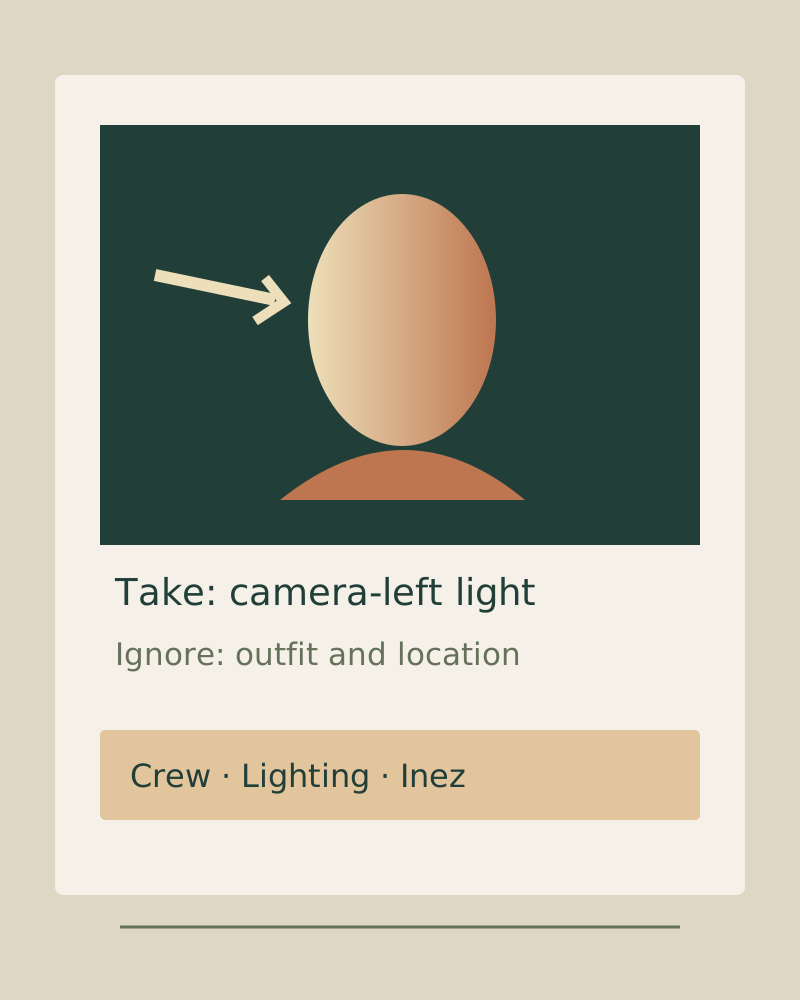
Leah receives silhouette, finish and exclusion references; Sam receives skin, hairline and eye treatment at readable detail; Inez receives one lighting diagram per setup with key position, modifier, distance and fill choices. They can reuse the same image with different departmental notes. Noor does not assume that a crew member who saw the aspirational client board knows which detail to reproduce.
A failed version of this scenario would send Leah a portrait chosen only for lighting. Leah could interpret its bright glossy garment as the approved palette and prepare the wrong look. The corrected styling packet says “take the relaxed silhouette; ignore the bright color and shiny fabric.” It also includes a clearly marked negative example of the finish to avoid. The useful improvement is a narrower instruction, not a promise that a board always saves a fixed number of minutes.
Noor and Inez reopen the embedded PureRef scene before the network is disabled, then check it again without a connection. The reference sits beside the capture with the current setup’s notes visible. A second machine receives the same saved revision and a simple exported fallback. When the light or location changes, Noor updates the specific instruction and checks the affected recipients rather than replacing the whole client mood board without explanation.
Start with four to six references when they carry distinct treatment decisions. Label each as hair, skin, eye or lip guidance; do not expect one portrait to communicate all of them unambiguously. For Dune, Sam’s skin reference says “take the visible natural texture and restrained shine; ignore the model’s lip color and hairstyle.” Open it large enough to inspect that texture. A thumbnail that hides the intended detail is not an adequate specification.
Call out silhouette, material finish, color and what should be excluded. Dune’s garment note says “relaxed tailoring in matte neutrals; avoid glossy bright fabric and ornate accessories.” Add the negative reference beside the positive one, with its purpose written directly on the record. The exact garment still needs availability, size, fitting and budget confirmation; a mood image is not a purchase order.
Include a diagram for each setup with key position, modifier, estimated distance, fill or negative fill, camera position and the intended visible effect. A photographed hand sketch can work if its labels are legible. The Dune setup states “large soft key camera-left; maintain a visible jaw shadow; reduce fill until the shadow reads.” The diagram is a starting arrangement, and the assistant verifies the real scene, exposure, safety and electrical requirements.
Three or four posture and expression references can define an initial range: standing neutral, turning profile, seated transition, moving between marks. Tell the performer which element matters and which elements belong to another department. Send the direction early enough to invite a question, but do not infer that it guarantees a fixed reduction in on-set time or authorizes a use of someone else’s likeness.
Save promising material into an ongoing channel or local collection with a quick reason for keeping it. Use the product’s browser clipper where it suits your workflow, then fill missing source information. Start a new commission by searching your own collection; search the wider web for identified gaps. This preserves a developing visual language while avoiding a late-night board built from unrelated search results.
Assemble a controlled subset for the client, then expand the details for the crew. A browser extension makes gathering easier, but it does not grant rights or guarantee the retailer’s current stock. Keep dates on supplier quotes and name a person to verify availability. A local library such as Eagle or a disciplined folder structure can make saved images findable; PureRef groups help within a scene but do not replace that cross-project archive.
Attach your own PNG, JPEG or WebP images at their original resolution. Write the attribute to take, the attributes to ignore, the department, owner and source. Choose the audience for each record. The export creates separate client, crew, shoot-day, research and sourcing HTML files, plus the complete restorable JSON source.
Images are embedded in the downloaded audience files, so opening the saved file does not require an image server. Source links still need internet. These files are not uploaded, published or sent by this tool, and an exported file does not prove receipt or approval. The page draft is not automatically saved: download JSON before closing it. This workbench does not float over other desktop apps, remove image backgrounds, infer lighting, check licenses or fetch product inventory.
Visual diagram unavailable. Audience choices and source exports remain usable.
The diagram counts actual selected records, not creative quality, licensed assets or recipient approvals. Drag or zoom to inspect it; the counts are also present in each export.
JSON retains full text, audience assignments and attached image bytes. CSV is a provenance ledger rather than an image archive; formula-like cell starts are neutralized for spreadsheet safety. Invalid restores keep the current draft. If the packet library cannot load, JSON and CSV still preserve your entered work.
This original silent, captioned lesson demonstrates the same audience and annotation decisions used by the workbench. The diagrams are owned illustrations, not real client photographs or recordings of vendor products.
The tool preserves entered records and images. It does not determine whether the direction is feasible or approved, and the animation does not show a verified external delivery.
Public prices below were checked October 7, 2026. USD rates exclude tax, promotions and region-specific changes. Annual equivalents have an annual commitment; commercial licenses, device support and the people actually operating a tool matter more than an attractive introductory price.
Milanote for client and departmental presentation, with PureRef for the desktop working set. One paid Milanote personal account is $12.50 monthly or $119.88 annually. Add the appropriate commercial PureRef license rather than assuming free personal access covers paid commissions: a Small business version license displays $49, subject to the studio and user rules. A single eligible user’s first annual combination is $168.88 before tax; it is not a $14.07 recurring monthly bundle.
Morpholio for real product sourcing, Milanote for the selected client direction and PureRef where the edit needs a floating reference. Budget the actual Morpholio tier and term shown in your Apple account, then add the licenses for the operators using the other tools. Do not quote one “cheap interiors stack” while omitting the device, sourcing features or extra users. The supplier’s chair price and the moodboard application price are separate budget lines.
Are.na Premium for the research spine at $7 monthly or $70 annually, with a local working reference and a curated export for collaborators. Combining $70 annual Are.na and a $49 eligible PureRef Small business version license is $119 initially for one eligible commercial user, with only the Are.na membership recurring on that stated annual term. For a personal, noncommercial project, verify the applicable Personal license instead. Select a smaller client view rather than handing over every research channel.
PureRef can be the only board application if the task is comparing approved working references beside the edit. Confirm the commercial license and image permission, use notes for the intended treatment and reopen the actual scene before starting. You still need whatever review and asset-delivery process the commission requires; a local scene does not create a client feedback system.
Milanote can hold the client direction, department boards and the surrounding notes. Accept that live mobile access needs a connection and that it will not become a native floating reference window. Export and test an offline fallback. Alternatively choose a planning canvas when brief context matters more than visual presentation, while checking the recipient access and export behavior.
Milanote Free can fit a small board within the account’s 100-item and ten-file-upload limits; saved, appropriately licensed image files and a browser-openable packet can provide a working fallback. PureRef Personal contribution access is relevant only for its allowed personal scope. A paid commercial commission should not be described as a universally free PureRef stack. If you need a true zero-subscription handoff, use the packet tool with your permitted images and verify the saved files; it does not reproduce PureRef’s always-on-top application behavior.
A directional photograph can imply a location, model, wardrobe and lighting package that your commission has not secured. The client may reasonably assume those visible choices are part of what they approved unless you narrow the scope. Keep a short, plain statement above the direction: “These references show the proposed light, palette and posture; final location, casting, wardrobe and shot list are confirmed separately.” Then list the actual unresolved items rather than relying on a disclaimer to fix an infeasible plan.
Do not propose a set you cannot plausibly achieve at the budget. If the reference depends on equipment or access you do not have, identify the achievable attribute and show a feasible substitute. A client unfamiliar with moodboards may benefit from a separate shot board containing the specific planned framings. Keep the approved aesthetic direction, the confirmed production choices and the final delivery agreement linked but distinct.
The board is a communication artifact, not a legal determination. Record what the client approved, who responded and which revision they saw. Confirm image permissions, supplier terms and contract language through the actual responsible process. An imported source URL, a checkmark or a tool-generated reminder does not verify rights or contractual consent.
Each template below uses the same portable fields: purpose, take, ignore, negative direction, source and permission, owner, constraint and decision scope. Replace fictional placeholders with your actual references rather than treating them as stock-image permissions.
Use saved discoveries as research inputs, then curate the deliverable you control. Surrounding recommendations and the service’s viewing experience can distract from the intended selection. A pin is not a source license; follow it back to the maker and preserve the actual origin before sharing an image externally.
A familiar layout tool may be sufficient for a client PDF or image board. Check export size, selectable text and small-screen readability. They do not become PureRef’s native floating desktop window simply because they can arrange images. Keep your saved deliverable and its sources rather than assuming a template solves the crew instruction problem.
Use a collaborative board when several people need to sort directions together. Capture the selected outcome and export the relevant subset afterwards. The working workshop can be larger than the client decision; make the final direction easy to read without navigating the entire discussion.
Prints can reveal scale and surface detail and let people compare options away from a screen. Check that the print actually reproduces the intended color and tonal distinction. Keep a dated digital record of the agreed selection so the crew does not work from an earlier arrangement; a printed board is not automatically more persuasive for every client.
A local library with tags and a dated folder system answer “where did I save that reference?” Preserve creator, source and permission details alongside the image. Research organization across years is different from the arrangement of one scene or one pitch, and exporting a board does not automatically create a searchable archive.
Client: What direction am I being asked to approve, and which production choices are still unresolved?
Use the selected direction and a plain decision scope.
These are review prompts, not customer testimonials.
Choose by the immediate job. Milanote is useful for a composed browser-accessible client board; PureRef provides a native floating desktop reference; Are.na supports connected long-term research; Morpholio Board supports specified products and sourcing. The planning layer may benefit from Storyflow. A client and working-reference combination is often sensible, but license, access and production constraints should decide the final stack.
Personal contribution-based access is distinct from commercial licensing. The current download selector labels Personal as personal use, Small business as commercial use with a maximum of three users per studio, and Business as commercial per-seat subscriptions. Small business displays a $49 version license; Business displays $10 per seat monthly or $8 per month annually. Do not assume an old zero-cost contribution claim grants a paid studio commercial use.
Its native desktop window can remain above other applications while you compare a reference with a live capture or edit. Saved scenes can contain embedded images for local retrieval. Current version 2 also has rich-text notes, comments, groups and hierarchy. A browser-openable export from this workbench preserves references but does not reproduce that operating-system window behavior.
Pinterest can support gathering; Milanote offers a more controlled selected board for client presentation, with a documented no-login read-only link. Check the source and permission behind a pin, choose a deliberate subset and write the intended attribute. Test the actual client link on a phone rather than assuming either service guarantees an accessible handoff.
A selected group of images, a line naming the intended attribute for each, the attributes to ignore and a clear decision scope. For the crew add departments, owners, lighting diagrams, garment or makeup details and negative directions. Keep source and permission information. Six to twelve images may suit one direction; a six-look editorial can need separate groups rather than one arbitrary count.
Usually separate the client direction, technical crew instructions and working shoot-day references. Crew material can split by styling, hair and makeup, lighting and talent. Research and product sourcing may add other collections. You do not need five subscriptions: the important distinction is each audience’s selected content and usable delivery.
It can hold the connected research behind a commercial project, including images, text and source links across channels. Current Premium presentation and channel exports also support a curated delivery. Select and annotate a focused project view, verify access and image permissions, and avoid handing a client an unedited research archive.
It is particularly relevant when real furniture, materials or products must be specified and sourced. Product links, cutouts, Ava lists and cut sheets help organize that information. Keep exact variant, price currency, checked date, sourcing owner and delivery confirmation. The workbench preserves entered sourcing fields but does not fetch stock or reproduce Morpholio’s product tools.
If location access is unreliable, prepare a locally usable working set. PureRef can embed images in a scene; verify that no required image is merely linked to a missing path. Milanote’s mobile apps currently require internet. Morpholio’s saved visuals, live sourcing links and synchronization are different checks. Reopen the actual intended deliverable on the intended device with the network off before traveling.
Use a tested no-login read-only link or a downloaded document they can open without special software. In Milanote, choose a named board, enable the read-only link and intentionally set the comment permission. Test outside your signed-in account and on a phone. A PureRef native scene requires the application; a portable audience HTML file opens in a browser but you must send or host it yourself.
It shows an explicitly rejected direction, such as glossy bright fabric when the styling should be matte and subdued. Label it as something to avoid and specify the relevant attribute. Without that label it can look approved. Use a small number of meaningful exclusions rather than filling the board with unrelated dislikes.
You can keep a shot list beside visual references, including in board tools with notes and documents, but the shot list needs sequence, identifiers and completion state. Keep the visual decision and execution checklist clear. The packet tool exports references and notes; it is not a full scheduling, call-sheet or sequential shot-status system.
Enough to inspect the attribute you are asking someone to reproduce at their actual viewing size. Skin texture, a soft shadow edge and surface finish can disappear in thumbnails. Retain an appropriately permitted higher-resolution source and test the exported file. This workbench embeds the uploaded raster at its original dimensions; it does not recover missing detail or guarantee faithful print color.
It can be a useful familiar layout route for a client-facing page. Check the export, actual small-screen reading and the permission for included material. A presentable page does not supply native always-on-top behavior, research-channel organization or a complete product-sourcing record. Choose it when the layout task is the main need.
Separate a reusable research library from dated project deliverables. Are.na supports connected channels; a local library such as Eagle or a disciplined folder structure can support file retrieval. Keep sources, permission notes and project revisions. PureRef hierarchy organizes a scene, while an exported board is only one part of a searchable archive.
They can share selected images, but the instructions should differ. The client receives an understandable direction and decision scope; the crew receives exact departmental attributes, exclusions and production constraints. Reuse an image with distinct notes when it serves different purposes rather than assuming one aspirational collage briefs everyone.
State what the references communicate and list what remains separately confirmed: location, casting, wardrobe, equipment and planned framings. Avoid suggesting production choices your budget cannot plausibly achieve. A separate shot board can help distinguish aesthetic direction from expected delivery. Keep the actual approval record and use the responsible agreement process; a disclaimer is not a guarantee against a dispute.
There is no independent trust ranking established here. Evaluate Milanote’s recipient access, PureRef’s local reference behavior, Are.na’s source organization and Morpholio’s sourcing workflow against your job. Inspect current documentation and try the actual handoff with your team. Popularity or a vendor’s testimonial does not prove your recipient opened a file or that an image is licensed.
Look for explicit currency, billing period, users, limits and commercial license scope. Milanote states its account limits and monthly or annual rate; Are.na distinguishes Guest block limits and Premium billing; PureRef distinguishes Personal, Small business and Business. Morpholio’s actual App Store offer defines the selected tier and renewal. A low displayed monthly equivalent is not automatically a monthly subscription.
A documented feature history can inform a shortlist, but it is not a benchmark of your capture workload, network or device. Rehearse the selected applications with your actual image set, export and reopen a file, and test the intended recipient access. Record those results rather than claiming a universal reliability winner or guaranteed speed for hundreds of images.
Start with the unmet job: client delivery, working reference, research or procurement. A Milanote-plus-PureRef combination can suit portrait and editorial work after commercial licensing is checked. Add Are.na when ongoing research warrants it or Morpholio when products need specifications. Verify a small pilot and the complete seat or device cost before subscribing to all of them.
A narrow tool or simple deliverable can be more useful than a large workspace. Consider a floating PureRef reference for an edit, connected Are.na research for a long project, a well-labelled printed board for a meeting, or a portable annotated file for a crew member. Their fit depends on the task; no market-wide popularity measurement is claimed.
No. It preserves the permission status, sources, annotations and audience choices that you enter, and flags missing structural fields. It cannot establish image licenses, product availability, budget feasibility or client approval. Verify those through the responsible source and production process.
The page does not automatically save your draft. Download complete JSON before closing it; that file retains the original attached images and full notes. A valid restore replaces the draft after validation, while an invalid or superseded import keeps current work. Audience HTML files are presentation deliverables; full-source.json is the restorable source.
Current public primary documentation and list prices were checked October 7, 2026. Account entitlements, live inventory and recipient approval remain separate checks. The guide’s Dune commission and other named scenarios are fictional. No authenticated comparative vendor trial, timing benchmark or ranking improvement is claimed.