Add quantities in the same units

A denominator tells you the size of the fractional unit. Addition becomes clear when both operands describe the same unit rather than treating the denominator as another number to add.

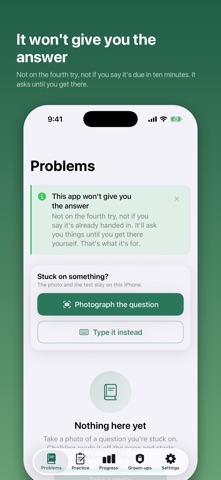
Chalkline App Store screenshot
Chalkline app icon

Put it into practice

Explain the original units

One half and one third describe different-sized parts of a whole. Before adding, ask how to express both in equal-sized parts. The tool uses the product of the entered denominators as a shared denominator, which is valid even when it is not the smallest one.

Inspect each cross-product

Multiplying a numerator and denominator by the same nonzero number preserves the fraction's value. The calculation shows each operand rewritten over the shared denominator so you can point to that preservation explicitly.

Reduce after combining

Add or subtract the comparable numerators, then simplify the result. A shared denominator that is larger than necessary can still produce the correct simplified answer. Explain the equality of the forms rather than memorizing an unexplained cross-multiplication pattern.

A worked example

For one half and one third, the common sixths make the quantities comparable: three sixths plus two sixths. Adding the original denominators would describe a different operation and a different value.

Exact fraction arithmetic and relative-magnitude visualizer

Fractions keep their meaning when the numerator and denominator are handled together. Enter two fractions to add, subtract or multiply, inspect the unreduced result and its simplification, and compare their relative magnitudes. Arithmetic uses exact integers rather than floating-point guesses.

The diagram shows relative magnitudes, not exact partitions of a whole. Signed fractions are supported, and denominators cannot be zero. Very large values can remain exact in the calculation while being too large for a useful browser graphic.

Inputs are processed in this page. Nothing is submitted to the app or a business. Download a result to keep it; this page does not automatically save your work.
What to keep in mind

This browser lab is an independent educational companion, not the app's protected student workflow. It deliberately offers an optional explanation and does not authenticate a parent or enforce the app's solution restrictions.

Take the next step
with Chalkline.

Chalkline's listing describes question-led tutoring from photographed problems and worked analogies. It states that full worked solutions in the app are available through a parent or teacher unlock.

View Chalkline on the App Store

The current listing requires iOS 26.0 or later. Some features have additional device requirements. Check the listing and purchase screen for current availability and terms.