Frame.io for media-linked feedback. Ziflow for proof version comparison. Filestage for reviewer groups and permissions. Storyflow for visual context. Choose the review workflow that matches your actual deliverable.
Version · Feedback · Revision · Decision · Version · Feedback · Revision · Decision ·
Feedback and approval are separate steps.
A comment tells you what someone thinks. An approval records a decision about a particular version. A useful studio workflow keeps both tied to the reviewed asset and the correct audience. These recommendations are editorial judgments from current official documentation checked October 5, 2026, rather than hands-on vendor tests or a measured ranking.
Frame.io V4
Feedback linked to media
Frame.io V4 share links support timestamped, range-based and drawn feedback when commenting is enabled. Unsigned reviewers enter a name and email for their first comment; leaving an unsigned session prevents editing its earlier comments. Its comments panel can mark feedback complete and export comments as CSV, XML, plain text or FIOJSON. Filtering also changes what is exported.
Choose it if: your team needs to locate feedback in a video or media asset. Check first: share permissions and whether your export includes every relevant comment. A completed comment means feedback was marked complete, not that the entire asset received final approval.
Ziflow's current Proof Viewer supports side-by-side and overlay comparison for accessible proof versions. Decision permissions govern whether the decision button appears. Auto Compare highlights pixel changes for static proofs and video, with sensitivity controls for static images; it does not cover audio, HTML5 or live websites. Copying comments between versions is identified as a Pro or Enterprise capability.
Choose it if: confirming revisions against a previous proof is central to the review. Check first: equal dimensions and version access. Ziflow itself warns that pixel differences do not reveal design intent and can produce noise. Human review remains necessary before approving.
Filestage's reviewer groups let invited people see the files, feedback and decisions in their own group. Reviewers can open a browser link without creating an account, but enter their name and email. Its guide describes due-date reminders and configurable permissions such as disabling comments on approved files, allowing downloads only after approval, and password protection.
Choose it if: internal and client review rounds must stay separate. Check first: the actual reviewer group access and plan needed for your chosen settings. No account requirement does not mean no identity prompt. Confirm what the client can see using the real review route, not only the collaborator view.
Storyflow's freelancer workflow describes collecting briefs, moodboards and concepts on a canvas and sharing a view-only link without a client account. Its pricing FAQ describes exporting boards as images or PDF. This supports considering it for a visual concept presentation; the retrieved sources do not establish the specialized versioned approval controls described for proofing tools.
Choose it if: the client needs the context around a direction before reviewing production assets. Check first: how you will capture the exact decision. As checked October 5, 2026, its freelancer page contains free-plan marketing, while explicit current pricing says paid-only early access, invited collaboration free today, and a standalone Free plan planned before the end of 2026. Treat that future plan as announced rather than available.
Freeze the review target. Name the asset and version. Keep the exported proof or exact file link alongside the review question so everyone discusses the same thing.
Ask for a specific decision. Is the composition approved, are corrections required, or is this only a direction check? Do not turn a positive reaction into a final delivery authorization.
Close the loop after revisions. Compare against the earlier version, review unresolved feedback, and record the final decision on the updated asset.
What actually changed?
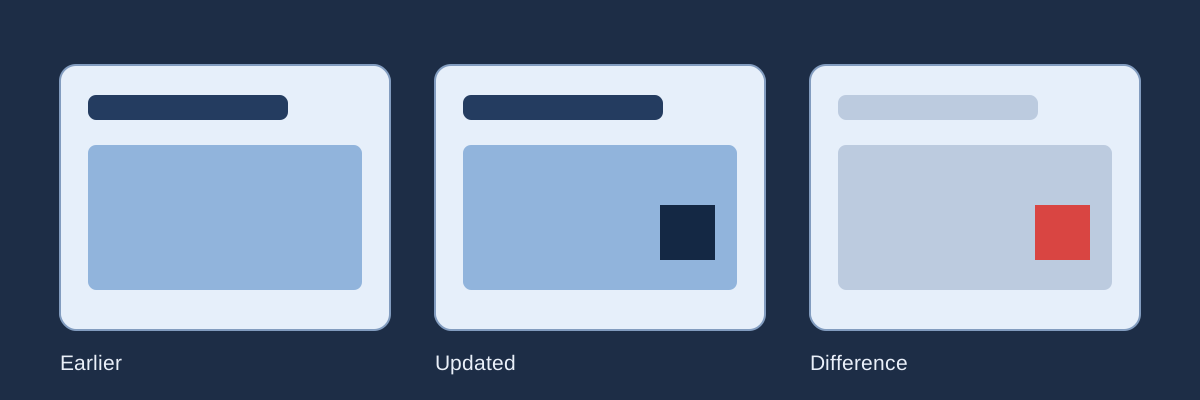
Upload two images with identical pixel dimensions. Pixelmatch compares their decoded pixels locally and creates a difference map. It does not recognize objects, assess quality, infer intent or approve work. No image is sent to a service by this tool. Export before leaving; there is no automatic save.
Lower threshold means greater sensitivity. The initial 0.1 threshold and excluded anti-aliasing match Pixelmatch 7.1.0 defaults. Red highlights differing pixels; yellow marks ignored anti-aliasing when detected. This page compares full raster dimensions without cropping, alignment, resizing or color-profile normalization.
Load two versions to begin.
Earlier versionUpdated versionDifference map
Names, dates and decisions are entered by you. This is a local review worksheet, with no identity verification, signature, timestamp authority or shared approval workflow.
JSON includes both decoded-image sources, labels, settings and your notes. It can be larger than the source files. Markdown includes comparison settings and notes, not images. An invalid upload or restore retains the previous comparison. Only the first decoded frame of an animated image is compared.
A difference is evidence. A decision needs context.
Use the map to locate revisions, then inspect the image and the actual review request. Compression, rendering and movement can produce differences even when a design is acceptable. Identical pixels do not establish correct copy, legal clearance or permission to publish.
Why must the images have the same dimensions?
Each pixel is compared at the same position. Different sizes cannot be compared here. Export matching raster proofs from the source design; the tool does not rescale or align them.
Does zero differing pixels mean approved?
No. It means the algorithm found no mismatches at your selected settings in the decoded images. Approval remains the reviewer's actual decision about the work and its intended use.
Can this replace a shared review service?
It helps one person inspect revisions and keep notes. It does not invite reviewers, authenticate anyone, send notifications, manage access or provide a verified audit trail.