Brief alignment
Agree the audience, required deliverable, scope and acceptance criteria before production begins. Ask whether the brief is accurate enough to start. Record unresolved information and the person who owns it.
Agree what each review is deciding, name the person whose response matters and keep the current version visible. A comment, a resolved note and an approval are different records.
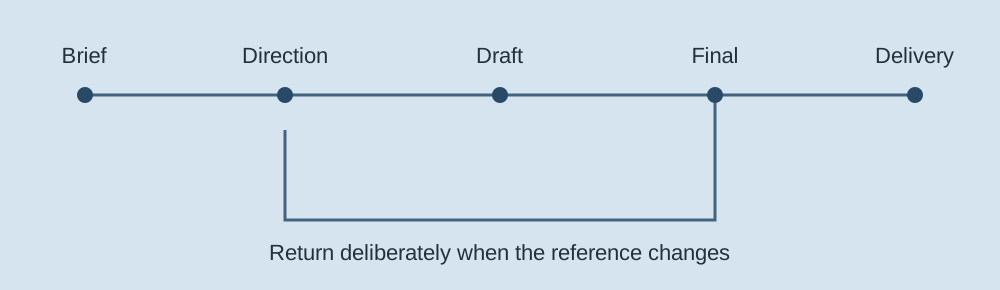
These are our recommended checkpoints for a studio workflow, not a universal approval standard. Combine or adapt them to the actual project. Each gate should have a current reference, an explicit question and an agreed decision-maker.
Agree the audience, required deliverable, scope and acceptance criteria before production begins. Ask whether the brief is accurate enough to start. Record unresolved information and the person who owns it.
Review the chosen concept and its relationship to the brief. Ask what is being accepted at this stage; a direction decision should not be mistaken for acceptance of an unfinished final asset.
Collect actionable feedback on the current draft. Consolidate contradictory comments and identify what must change. Distinguish a suggestion from a decision and retain the full note rather than a shortened summary.
Review the exact version intended for delivery, including the required formats and acceptance criteria. Earlier direction approval is context; it does not establish approval of this final version.
Confirm the agreed handoff and destination. Record what was delivered and what the recipient actually confirmed. Delivery is separate from publishing, campaign performance or legal consent.
Its current review-decision guide separates Approve Version and Request Changes. Administrators can enable additional decisions. Its permissions guide also distinguishes giving feedback from being asked for a review decision. Use that distinction to identify who contributes and who decides.
Review decisions · Decision permissionsIts workflow guide describes stages, reviewers, settings and routing. Stages can be sequential or parallel, and the allowed number depends on the edition. A multi-stage workflow is useful when different people decide different questions; verify your actual edition and configuration rather than assuming every plan supports the same process.
Current workflow overviewIts comments guide documents annotations, time-based comments, completion marks and exported feedback. Those records can help an editor apply a change. Completing a comment means progress on that feedback, rather than automatically establishing the final release decision your team requires.
Current V4 comments guideThese comparisons use current public primary documentation, not authenticated product tests. Prices, legal approval requirements and account entitlement are not evaluated. Our workflow below records what a person enters; it does not connect to or impersonate any product’s approval system.
State what is ready for review and what the person is being asked to decide. Avoid treating silence, a positive comment or elapsed time as approval.
When scope or content changes, choose the earliest checkpoint that needs another decision. Preserve previous records as history and identify the new version.
Record the recipient’s actual response and the delivered version. If something remains open, describe it rather than turning a delivery event into a completed campaign.
A record can preserve a human decision. It cannot manufacture one.
A campaign approval workflow is an agreement about decisions: who owns each question, which version they review, what their answer permits and what happens when the work changes. A review platform stores conversations and files. The project team still has to define the authority behind those records. Start with that agreement rather than a list of software features.
A contributor provides useful input: an account manager spots an audience mismatch, a designer proposes a stronger hierarchy, or a channel specialist checks an aspect ratio. A consolidator turns those inputs into one coherent response. An approver decides whether a defined piece of work can proceed. One person may hold several roles on a small project, but the roles should remain clear.
For a studio working with a client, name the client decision-maker and a replacement who can act when they are unavailable. If brand, regional marketing and procurement all need to participate, list their questions separately. “Client approval” is too vague when one stakeholder accepts the concept and another controls the budget. The creative lead should not be expected to infer which comment has authority.
Ask each approver to confirm the scope of their decision. A brand lead might accept the visual direction but cannot verify a technical product claim. A producer may confirm that the requested asset can be delivered but cannot authorize media spend. A clear chain makes it easier to involve the right person early without sending every intermediate draft to everyone.
Identify the asset and version, the question being decided, the person who owns the decision, the evidence they need and the agreed response process. For example: “Please review landing-page copy v3 against the signed brief and the attached claims list. Confirm the headline and offer language, or list the changes required before design begins.” This request is more actionable than “Thoughts?” and more precise than “Please approve the campaign.”
Keep the reference stable. A link to a document that keeps changing can make a later decision hard to interpret. Use the platform’s available version controls or retain a dated export alongside the decision. If a file is replaced, label the replacement and explain what changed. A typed version label in this page’s worksheet is a reference supplied by you; it does not fingerprint or retain the actual file.
Agree review windows and escalation with the project participants. Do not manufacture an approval because a deadline passed or a reviewer stayed silent. If the decision is missing, record it as missing, explain the impact on production and contact the agreed escalation owner. Whether any contractual procedure allows work to proceed is a separate matter for the people responsible for that agreement.
The five checkpoints above describe the worksheet’s sequential studio process. A campaign may need a more detailed map: brief, concept, copy and execution reviews, with specialist checks running alongside them. Map these decisions to your actual deliverables before starting. Do not force a parallel approval chain into a single-person record and then assume all reviewers have signed off.
Settle the audience, objective, proposition, deliverables, channels and measures of success. State constraints such as supplied footage, licensed photography, mandatory wording and the client’s review responsibilities. Separate a required launch condition from a desirable enhancement. A useful brief decision answers whether the team has enough agreed information to develop the work.
For a fictional membership campaign, a brief might specify a returning customer audience, a seasonal renewal offer, one landing page, two email variants and a short video. An unanswered question about who qualifies for the offer is a blocker to copy, even if the visual direction is ready. Record that dependency rather than burying it in meeting notes.
Show how the proposed idea serves the brief. Include enough reference material or rough execution to explain tone and structure. Ask whether the chosen direction is right and what conditions apply. Avoid polishing several full executions merely to discover that the underlying proposition is wrong. Conversely, an abstract moodboard may be too ambiguous to establish what the client accepted.
Capture the chosen direction and the rejected alternatives with their reasons. This gives later discussions a useful reference. If a stakeholder asks for a different concept after production begins, the team can describe which earlier decision is being reopened and estimate the effect on the remaining work.
Review the offer, claims, headline, calls to action, names, captions and required qualifications. A copy review is especially useful before recording narration or preparing numerous channel adaptations. Provide the text in a readable form, while retaining enough layout context to show what is prominent and what may be overlooked.
In this worksheet, the draft gate can hold that copy decision. If a project needs independent script and layout approvals, keep those distinct records in your real review system. Accepting a script does not automatically accept a later cut containing different language, shortened qualifications or a new end card.
Review the final asset, not just the earlier idea. Check the agreed formats, links, subtitles, logos, crops and supplied wording. Compare the current version with the last decision and the requested changes. A useful execution review confirms both that the changes were applied and that the asset still meets the brief.
List derivatives explicitly. Acceptance of a landscape master video does not necessarily cover a vertical edit with different framing and a shortened message. Decide which adaptations need individual review and which can follow agreed production rules. Keep that decision visible in the delivery record.
Some projects require legal, product, accessibility, rights or market-specific review. Invite those owners while the relevant decisions are still changeable. Give them the claims, intended territories, channels and asset references they need. The required checks depend on the project; this guide does not establish a legal compliance standard.
When several specialist reviews run in parallel, define the release condition: which responses are required, which conditional changes must be resolved and who checks completion. The local actor below cannot model multiple parallel reviewer branches. Record the complete external evidence in its notes only after your actual process establishes the decision.
A vague request such as “make it more premium” leaves the production team guessing. Ask for the location, the observed problem, the intended change and the reason. For a video, identify the time or frame. For a layout, point to the relevant region. For copy, identify the sentence and what it should communicate. Asset-level comments are useful because they preserve context; a disconnected chat message often loses it.
For example, “At 00:18 the subtitle covers the product label; move it above the lower third while keeping the wording unchanged” gives an editor a specific task. “The opening feels slow; can we start on the product shot because this placement has no pre-roll context?” states an observation and the intended audience context without pretending to dictate every edit.
Collect the required reviewers’ input before sending the production team a response. Group duplicates, separate corrections from preferences and flag conflicts. If one person wants a shorter opening and another asks for a longer explanation, the consolidator should seek a decision rather than asking the editor to satisfy incompatible instructions.
Retain the original feedback and publish a consolidated change list that points back to it. Give each requested change an owner and a disposition: apply, clarify, decline with reason or defer by agreement. Resolving a comment should show how it was handled. It should not erase evidence or automatically transform a request into approval.
A new approver can uncover a genuine omission. First establish whether they own a required decision and whether their concern changes the approved scope. If a product specialist identifies an inaccurate claim, reopen the appropriate copy or brief decision. If a new stakeholder offers a stylistic preference after final review, explain the change and its effect before committing production time.
Use a revised reference and an explicit return point. Returning to copy may require a new voice recording and another execution review. Returning only to a delivery gate is insufficient when the underlying message changed. Keep the old decisions as history and label them with their old version rather than deleting them to make the timeline appear tidy.
Write a decision record that another person can understand without reading every message. Include who decided, the exact reference, the question, the outcome, any conditions and the evidence location. If conditions remain, state who resolves them and how the result will be checked. “Approved subject to replacing the offer date” leaves an open action; it is not evidence that the replacement was inspected.
A handoff should identify the delivered assets and destination, plus any exclusions. If the client confirms receipt but has not reviewed the final version, record receipt rather than acceptance. Keep publication and campaign measurement separate. An asset can be delivered correctly while a campaign is still awaiting scheduling, rights clearance or a channel owner’s decision.
This fictional example follows a small studio producing a renewal campaign for a membership organization. It illustrates decision structure, not a recommended universal schedule or a report of customer results. The team has agreed a six-week planning window, with review dates set around the client’s availability. No elapsed time substitutes for a missing decision.
| Decision | Reference and owner | Evidence and next action |
|---|---|---|
| Brief alignment | Renewal brief v1; client campaign lead | Accept audience, offer eligibility and asset list. Retain the decision alongside the brief. Production can develop the concept within those boundaries. |
| Creative direction | Concept board v2; brand lead | Accept a member-story direction, with permission to use the supplied visual references. The board is not approval of an unfinished video. |
| Draft and copy | Script and landing-page copy v3; campaign lead | Confirm offer language and mandatory qualification. The product owner supplies the claim evidence. Recording waits until this question is settled. |
| Final execution | Master video v4 and landing-page export v4; named release owners | Review the exact files and channel derivatives. A subtitle correction is requested; v4 remains historical and the amended v5 needs another final review. |
| Delivery confirmation | Accepted v5 package; receiving producer | Confirm receipt of the specified files and open the separate scheduling task. Delivery confirmation records the handoff, not campaign performance. |
Suppose the client changes the renewal deadline after the master is accepted. The studio identifies the affected script, landing page, email variants and video end card. The new reference is “Renewal package v6.” The return point is draft review because the offer wording changed. The final execution and delivery decisions must be recorded again for the revised assets.
A useful note reads: “Campaign lead requested a deadline change in the supplied decision thread. Return to draft review for revised offer wording. Existing v5 decisions remain historical. The change affects the end card, landing page and two emails; production owner will provide the revised asset list for execution review.” It identifies cause and scope without inventing acceptance of v6.
Enter the actual project title, initial reference and complete notes, then start the actor. At each gate, enter the reviewer and evidence only when that external decision exists. Save the source JSON before closing the page. A revision requires a new version label and a current or earlier gate; it preserves accepted events and returns the record for new decisions.
The source JSON can be restored and replayed. The history CSV supports a readable decision log, and the handoff notes retain complete input text. None of these exports replaces the source files, reviewer authentication or the client’s chosen approval system. If parallel legal and regional decisions are required, maintain them in that system and reference the evidence here.
Choose a system around the assets and decisions you need to preserve. These are interpretations of current public primary documentation, not authenticated product tests or a ranking by measured approval speed. Verify entitlement, external access and your actual workflow before adopting a platform.
| Platform | Useful capability | Selection question |
|---|---|---|
| Storyflow | Its current site presents a visual workspace combining boards, documents and creative planning. Product overview. | Can your team distinguish contextual feedback from the release decision? Its pricing page says standalone Free is forthcoming, while invited collaboration is available without a paid seat. |
| Filestage | Review decisions distinguish accepting a version from requesting changes. | Who can comment, and who must decide? Check reviewer permissions against your chain. |
| Frame.io V4 | Time-based comments and annotations support feedback in editing context. | How will your team record release decisions separately from completion of individual comments? |
| Ziflow | Its workflow documentation describes sequential and parallel review stages. | Which stages and reviewers does your edition support, and what condition releases the next stage? |
| Wrike | Its proofing overview connects asset review, version comparison and guest feedback to work management. | Does your chosen entitlement provide the needed proofing and external-review experience? |
| ClickUp | Proofing attaches comments to images, videos and PDFs. Cloud-storage attachments are excluded by that guide. | Will your actual file types and storage path work? Check plan usage allowances rather than assuming unlimited proofing. |
| Asana | Approval tasks let a reviewer approve, request changes or reject, with comments for context. | How do approval tasks reference the correct file version and connect to the remaining production work? |
| monday.com | Its permissions guide distinguishes board access and permitted actions; shareable boards support invited guests on eligible plans. | Can clients see only the intended material and make the intended changes? A status field needs an agreed meaning and owner. |
| Airtable | Record comments and record history provide structured context around work records. | How will you preserve durable approval evidence? Current documentation says revision history has plan-dependent retention and no product export option. |
For a design-led team, Figma comments keep discussion on the design canvas or prototype. For copy, Google Docs suggestions make proposed text edits visible before acceptance. Both still need a clear project-level decision and a stable reference.
A shared drive can hold the agreed asset versions and a separate decision log when the review chain is simple. Make file naming, permissions and the log owner explicit; storage organization alone does not create an approval process. For video, Vimeo review links offer feedback around the video. Confirm the current review experience and account entitlement with the owner before inviting a client.
A solo studio may start with one asset workspace and one decision log. A motion studio may prioritize time-based comments and version comparison. An in-house team may need production tasks and dependencies connected to review. A campaign with several independent release owners may need configurable routing and permissions. The right choice depends on those requirements, not the length of a product’s feature list.
Ask about reviewer friction as well as internal administration. Can an external reviewer open the asset without unexpected account steps? Can they find the question they own? Can an administrator retrieve the accepted version and decision after the project closes? Test those actions with a representative client workflow before migrating active work.
Compare total operating cost: paid seats, guest access, proofing entitlement, storage, integration setup, history retention and the work needed to maintain templates. Do not assume a free collaboration invitation means a free standalone account, or that a trial includes every paid feature permanently. Obtain current terms for your team size and preserve a source export before offboarding.
Track review starts, actual decisions, revision requests and the reason a gate reopened. Separate waiting for a reviewer from production time and time spent clarifying a brief. If a project needs several rounds, look at the content of those rounds before calling the workflow inefficient. A necessary correction is different from an avoidable mismatch in expectations.
Common causes of rework include incomplete brief decisions, reviewing the wrong version, contradictory instructions, missing decision owners and late discovery of a required reviewer. Use the next project’s template to address the observed failure: add the missing question, clarify authority or link the required evidence. Do not promise that a new platform will remove these problems by itself.
When a review stalls, identify the missing decision and its consequence. Offer the agreed escalation route, explain which production tasks can safely continue and which depend on the answer, and update the plan when the response arrives. A project-specific review window can be useful when agreed in advance; an arbitrary automatic deadline should not turn a missing response into acceptance.
Only if it is the explicit decision your agreed process requires, made by the responsible person on the correct reference. “Looks good” may refer to one detail or one stage. Ask what was accepted and preserve the answer with the asset version.
No universal rule applies. Identify whose input is needed for each question. Invite required specialists early enough to affect the work, and give the final decision owner a consolidated response rather than unrelated threads.
Agree scope and review responsibilities for the project. Distinguish correcting an unmet requirement from introducing a new direction. When a change expands the work, document its impact and the decision to proceed instead of quietly treating all requests as equivalent.
Keep both inputs visible, describe the conflict and ask the named decision owner to resolve it. A production team should not be forced to guess which contradictory instruction wins. Record the chosen direction and its rationale.
They can when your actual process supports it and the relevant reviewers have a sufficiently stable reference. Define how conditional changes return for inspection and which responses are required before release. This page’s actor remains sequential.
No. It preserves entered evidence and guarded workflow events. It does not authenticate people, sign agreements, retain creative files or verify the external decision. Keep authoritative evidence in the appropriate project system.
Retain the agreed brief, final asset references, decision records, change history and unresolved items according to the project’s requirements. Record receipt separately from publication, acceptance and campaign results.
A real XState actor moves through these five gates. Advancing requires a named reviewer, complete evidence note and your explicit confirmation that an external decision was recorded. This is a planning record: typed names and checkboxes do not authenticate a client or create approval. No messages, invitations or publications are sent.
The revision action needs the same named person and evidence note plus a different version label. It can return to the current or an earlier gate. Decisions after the chosen gate must be recorded again; older events remain historical. This record uses your labels and does not compare file bytes or verify an external approval system.
The source export contains the initial project and complete accepted events. Restore creates a new actor and replays those events, rejecting an invalid sequence before replacing your current workflow. Derived state from a saved file is not trusted. Project setup locks after starting; use a revision to change the current reference or reset to create another project. Data stays in memory and clears on reload, so save the source to retain your record.
Does this record identify the actual decision and current reference?
No. The worksheet records your description of an external decision. It has no authentication, signatures, file comparison or connection to your client’s review platform.
This example actor advances sequentially. Adapt your real process before starting rather than inventing approval records to bypass a checkpoint. A different project may need fewer checkpoints.
Yes. A new version can return to any of the five gates with a named person and an evidence note. Historical decisions remain in the record.