The participant's operation
Viewing, commenting and editing are distinct tests. Keep the role, plan and actual result.
Choose a FigJam alternative by the job it must preserve. Test participation, retain the reason and give every handoff a home.
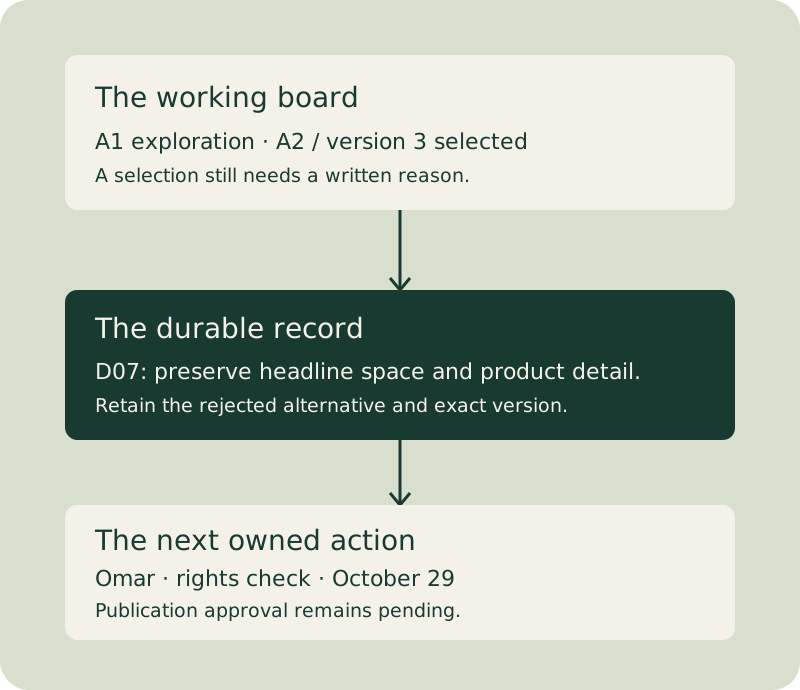
A board can preserve the exploration. A record preserves why the team chose.
Viewing, commenting and editing are distinct tests. Keep the role, plan and actual result.
Carry the selected version, rejected alternative and unresolved question into writing.
Accountable work needs a person and a recoverable handoff, rather than a prettier sticky.
Verify the archive and its editability before assuming an import preserved the project.
Inspect the recurring failure before buying its replacement.
Can the actual client view, comment and edit with the permitted plan and account condition? Retain failed tests and retests.
Can someone absent from the workshop recover the choice, reason, alternative and next action from the written record?
What happens on the working device and network? Compare the same operation before and after reducing the active board.
Watch the people who run the session and receive the handoff. Existing design integration may be worth keeping.
Test the required owner, state, date, filter and reminder behaviour. Current canvases and dedicated project tools have different capabilities.
An arrangement can show what the room discussed. The decision record must explain what the team chose, why it chose it and what still needs checking.
This original, silent 24-second teaching video uses the fictional Window Seat example. A2/version3 is a working selection; publication approval remains pending.
Use the video controls to play, pause, seek or enter fullscreen.
These are fictional decision examples, not customer testimonials or vendor performance results.
Lena records three clients viewing the selected concept, two initially commenting, and a third needing a corrected invitation and retest. The invented agency chooses new workshop and concept-review tools because the actual required handoff works.
Keep the initial failure alongside the retest.
Omar writes three decision records. A colleague who missed the sessions can recover the version, reason and next owner. The fictional studio retains FigJam and the writing rule instead of buying another canvas.
Illustrative budget: twenty minutes per record, sixty minutes in total.
Jo reviews the archive and contract evidence before choosing cancel, retain or extend the pilot. A planned task is not a completed cancellation, and a quoted allocation is not an actual invoice.
Record the owner, date and reason for the decision.
Primary documentation checked October7, 2026. Plans, access and features can change.
A team can dislike a FigJam workflow for several different reasons. Clients may struggle to participate. A workshop may produce a board without a durable explanation. A large file may be slow on the devices people use. The interface may fit the designers better than the rest of the team. Or the recurring job may be a structured tracker rather than an exploratory canvas. Those problems call for different experiments.
Start with a specific recent failure: who was doing what, on which file and device, with which permissions, and what happened instead. “The client could view the concept but could not leave the required feedback” is actionable. “We need a better whiteboard” is too broad to tell you whether a new subscription will help.
The migration desk below keeps entered participation tests, dated tasks, decision handoffs, archive records and quoted costs together. It helps inspect dependencies, incomplete evidence and the budget you enter. It does not run a real vendor access test, validate a quote, import a FigJam file or prove that a team adopted a replacement. Keep a planned experiment distinct from an observed result.
Separate viewing, commenting and editing. An account-free view does not prove a client can leave feedback, and an editor licence does not automatically grant access to the right file. Test the exact operation with a representative participant outside your organisation, then retain the plan, permission setting, date and observed result.
Current Figma seat documentation distinguishes Full, Dev, Collab and View seats. Full is not compulsory for FigJam creation: Dev and Collab also support it, while View permits viewing and commenting on accessible files. Product capability and file permission remain separate. Audit the actual roles before pricing every participant as a designer.
FigJam also supports open sessions on supported plans. They provide 24-hour editing windows for visitors without a Figma account and do not add those visitors to team billing. Visitor comments and audio are unavailable, and FigJam AI is unavailable during the session. Later access has different conditions. An open session may solve live participation while failing an asynchronous comment requirement; test both instead of treating “no account” as a universal pass or failure.
A collection of clustered stickies can preserve what was discussed while leaving the final choice, rejected alternatives and reasoning unclear. This can happen in any product, but it is not inevitable that every board becomes useless after a fixed number of weeks. Make the durable record an explicit deliverable.
Assign someone to write the selected decision, its reason, evidence, unresolved question and next owner. Link the board and identify the version that supports the record. A team might choose to do this the next day or within a week; that is an agreed working cadence, not a scientific expiry date. Reopen the document later and ask whether someone who missed the session can understand why the decision was made.
Measure the actual failure on the working devices and network. Keep file size, embedded images, object count when available, browser and the operation being tested. A slow initial load, delayed dragging and video playback are different problems.
Try splitting active work by project or phase, archiving completed material and replacing unnecessarily large embedded assets with appropriately sized previews or references. Confirm that external links remain accessible to the participant. Compare the same representative task before and after the change. This guide has not benchmarked the vendors, so “lighter” describes a narrower workflow rather than a proven universal speed advantage.
Watch a strategist, producer or account manager do the actual task. Find whether the difficulty is vocabulary, navigation, permission, an unfamiliar convention or missing functionality. An interface familiar to designers can be a useful shared environment when the organisation already works in Figma. The same familiarity should not be assumed for a visiting client.
Keep design-file integration in the trial when it matters. A replacement that makes a workshop easier but breaks the design handoff may create more work overall. Marketing and production teams should test the documents, references, schedule and approval work they really need rather than assuming their job titles make one tool unsuitable.
Owners, dates, statuses, dependencies, filters and reminders indicate a structured workflow. Decide which capabilities are required and which data must remain the source of record. An attractive arrangement of tasks is not the same as an accountable queue.
It is also outdated to claim that every canvas lacks structured features. Current Miro Tables documentation describes field filters, timeline dates, formulas and optional due-date notifications. Compare the required schema, permissions, automations and export with a dedicated database or project tool. The question is whether the chosen product supports your actual tracking job, not whether its marketing category contains the word canvas.
Staying can be sensible when design files and workshops already connect well, the necessary people have workable access, and the recurring difficulty can be corrected without another vendor. Do not treat a different product's longer feature list as evidence that the team will use it well.
Try the written-conclusions rule if the missing element is reasoning. Try a smaller active board if the binding constraint is a difficult file. Test open-session and permission options if the actual obstacle is participation. Compare the full handoff and recurring cost with the proposed replacement before committing to migration.
There is no universal quarter of friction or six-week completion guarantee. Training, archive access, security approval, template complexity and existing contracts change the work. A phased pilot is useful because it can reveal those obligations before a team depends on the new setup.
These examples are invented, not customer outcomes or evidence that one vendor causes a particular improvement.
A mixed agency tests a move. Seventeen people work on a campaign, five of them designers. Clients have been emailing screenshots with comments detached from the selected concept. Producer Lena proposes a Miro workshop trial and a Milanote concept-presentation trial. Her question is specific: can the client identify the selected card and give the required feedback with the permitted access?
On October 28, 2026, the fictional trial is planned to test viewing, commenting and live editing separately. A successful view alone will not satisfy the comment requirement. Lena records the account and permission conditions, asks the client to refer to concept A2/version3, and preserves the actual result when the session occurs. The team moves only if that evidence and the subsequent written handoff justify the extra vendor and archive work.
For a completed fictional outcome, suppose all three trial clients view the selected concept, two leave version-linked comments after signing in, and the third initially cannot comment because the invitation is wrong. Lena corrects that permission and records a successful retest rather than deleting the failure. The agency then adopts Miro for workshops and Milanote for concept presentations, with the written decision record retained. The improvement in this invented case is a recoverable feedback reference instead of an emailed screenshot; it is not measured evidence that the vendors cause fewer revision rounds. The transition still includes training and archive work.
A design studio tests a habit. Ten people work in the existing Figma environment, eight of them designers. Their problem is that a later reviewer cannot reconstruct why a concept was selected. Rather than treating a new board as the answer, facilitator Omar takes responsibility for a concise decision record after each workshop. A colleague who missed the session reads it and checks whether the reason, alternative and next action are recoverable.
The studio's illustrative record reads: “Select A2 for the Window Seat campaign because its wider image leaves room for the required headline at the agreed crop. Keep A1 as a reference, not an approved alternative. Omar will confirm the rights note and link the version3 board by October29. Publication is pending the separate client approval.” This preserves a reason and a boundary. The existing board remains a visual reference.
In the completed fictional studio case, the absent colleague reads three such session records and can recover the selected version, reason and next owner. Omar budgets an illustrative twenty minutes per record, or sixty minutes across the three sessions. The studio keeps FigJam and the document rule instead of buying another canvas. Those values are assumptions in the example, not a promise that every workshop takes twenty minutes to document.
This is a conditional fictional plan beginning October12, 2026. Its durations and quantities are assumptions you can replace in the desk; completing a scheduled task does not prove the access test passed.
| Week and dates | Concrete work | Owner and evidence needed |
|---|---|---|
| October12–18 | Choose one live project, Window Seat, and record its current participation failure | Lena retains the old workflow, client role and a specific operation to test; a decorative demonstration board is insufficient |
| October19–25 | Rebuild three frequently used templates: kickoff, concept selection and decision handoff | Omar checks the actual fields, references, permissions and export rather than copying a visual background alone |
| October26–November1 | Run a real participant trial on October28 | Lena records separate view/comment/edit outcomes, account conditions and the actual feedback reference |
| November2–8 | Archive the important old boards and test one representative import | Ana verifies a PDF reference, original file access and which areas remain editable; essential evidence is checked before cancellation |
| November9–15 | Work with the facilitators who still use the old setup | Omar sits through one genuine session and records the remaining obstacle, rather than treating a shared link as adoption |
| November16–22 | Decide explicitly which subscription and archive access remain | Finance owner Jo reviews the contract and evidence, then records cancel, retain or extend the pilot with a dated reason |
A literal request the fictional team can adapt is: “Please review A2 on Window Seat/version3 and reply with approve or the specific change required for that version. The selection is a working recommendation; we will record your response separately before publication. If you cannot comment with the supplied access, tell Lena which operation failed so she can record the result.” The desk records the request and response you enter; it does not send this message or certify consent.
These products enter different parts of a creative workflow. Compare the actual operation, participant role, source-of-record requirement and exit path. The descriptions are current documented capabilities rather than an uptime study, user-satisfaction ranking or measured speed contest.
Miro can support a mixed workshop with visual material, templates and facilitation. Its current pricing describes visitor editing without sign-in on Starter, with registered external guests and further controls on Business. Anonymous public editing and controlled ongoing guest access are different choices. Trial the required confidentiality and feedback behaviour rather than selecting purely on the easiest link.
The same page lists Docs, Tables, Timelines, Kanban and Slides on the canvas, with further structured capabilities and integrations by plan. This changes the older assumption that Miro cannot hold writing or tracking. Confirm whether its actual tables and handoffs satisfy the project, while still assigning someone to write the reasoning behind a decision.
Starter also lists a timer, voting, private mode and notes. A facilitator can time an activity, collect choices and let participants develop ideas privately before discussion. Test the actual session settings and participant role; these mechanics do not write the final decision or establish client approval.
The pricing page checked October7 lists three most recent editable boards on Free and Starter at $8 per member per month billed yearly. That is a yearly commitment expressed as a monthly equivalent, not necessarily a month-to-month invoice. Read the selected plan and contract before costing a short pilot.
Its FigJam migration guide describes importing exported PNG/JPG/PDF content as a static reference. Recreate the areas requiring further native editing. This does not preserve the original object relationships or produce a two-way connection back to FigJam. Test a representative active board instead of assuming an import button proves an editable migration.
Milanote suits a board where images, notes and references form a deliberate presentation. Evaluate an actual concept review, crop and feedback reference instead of assuming it must behave like a flowchart editor or facilitated workshop. It can be useful when the visual arrangement is itself part of the communication.
Its comment documentation describes comments attached to cards, mentions and replies, including comments enabled on read-only boards. Commenting requires a logged-in Milanote account. A share link that permits viewing therefore does not by itself solve account-free commenting. Preserve that operation distinction in the participation test.
Its free-versus-paid sharing guidance says shared content created by a professional user does not consume the free collaborator's own card allowance; the collaborator's newly created cards still matter. The plan page lists a free allowance of 100 notes, images or links and ten file uploads. Price the actual owners and creators rather than assuming every viewer must buy a paid subscription or every collaborative action is unlimited.
Whimsical provides flowcharts, wireframes, mind maps and documents. Its constraints can suit a repeatable diagram or a clear written explanation. Test one messy exploration and one finished flow: the better fit may differ between those jobs. It is not useful to promise that every team will finish faster merely because the interface has fewer choices.
The current pricing page and billing explanation distinguish unlimited boards from creation allowances on Free: fifty new board objects and fifty document blocks a month, plus a one-time AI-credit allowance. Free viewers and guests are distinct from paid editors. Pro is listed at $12 per editor billed monthly or $120 per editor billed annually. Test the actual plan's file access, exports and facilitation features; do not reuse an outdated small-board-count limit or infer that every available feature has identical access on all plans.
The current feature comparison explicitly names voting and a timer. Include those in a real facilitated diagram session rather than treating Whimsical as having no facilitation. Confirm their selected-plan availability and participant operation in the trial.
Mural's feature page and pricing document a timer, voting, private mode and an outline for guiding participants. Private ideation and a sequenced session can matter when the facilitator needs to reduce anchoring and control which material is visible. Those are concrete workshop mechanics, rather than evidence that it is objectively the deepest product for every team.
Current pricing lists three editable murals on Free, unlimited members and visitors, and facilitation capabilities across plans. Registered ongoing guests are a separate plan decision. A casual brainstorming group may not need the same administration as an organisation running repeated client workshops. Run the genuine session with its facilitator, not only a solo tour of the canvas.
The official open-source project documents real-time collaboration, browser-local autosave and export to an editable .excalidraw JSON file. It is inaccurate to say the free application has no persistence. Browser storage remains different from a managed team workspace and a separately stored backup, however; export work you need to recover.
A hand-drawn diagram can communicate that the idea remains provisional. Try a short shared sketch when that is the actual job, and keep a written decision record when the sketch becomes consequential. Distinguish the free application from optional commercial services or a self-hosted deployment. The JSON format documentation describes the saved scene, but a scene file is not automatically a workflow of owners, approval states and deadline reminders.
Notion's database documentation describes pages with properties and several views. Its property guide supports relevant fields such as status, person and date. A campaign can have one page per deliverable, with its owner, approval record and due date, instead of repeatedly drawing the same tracker.
Use a view to inspect the needed subset while retaining the underlying records. Check collaboration permissions, reminders and exports on the actual workspace. Writing can live in the item page or an explicitly linked decision document. Notion does not provide the same freely arranged exploratory surface as a canvas; keep that job elsewhere when it matters, rather than claiming a database eliminates the need to think visually.
Storyflow is another option for arranging text, images and documents while developing an argument. Its own FigJam comparison describes context from the current board plus up to one Tactic and three explicitly mentioned documents. Confirm the context supplied to the model instead of assuming it can read every project or source.
That article distinguishes this creative arrangement from a facilitation or structured-tracking workflow. Treat those descriptions as vendor claims and check the current help and selected plan for the exact requirement. In particular, collaboration and team permissions can vary by edition or workspace; they are not established for every plan merely because a board can be shared.
The source specifically says Storyflow is not a timer, voting or private-ideation environment and does not provide structured tracking. Those are meaningful selection boundaries: a facilitated workshop or accountable production queue should test the actual required capability instead of assuming documents on a canvas supply it. These are the publisher's stated limitations, rather than an independently benchmarked claim about collaboration quality.
Its current pricing says free-forever access is proposed for later2026, while early access is paid and invited collaborators can currently join without a paid owner subscription of their own. Plus is listed at $95.88 billed yearly, equivalent to $7.99 a month; Pro at $168 yearly, equivalent to $14; Max at $468 yearly, equivalent to $39. Those future-free, invited-collaborator and paid-owner conditions are separate.
Airtable can expose the same underlying table through grid, calendar, gallery, kanban and other views. Its view documentation describes filtering, sorting, grouping and collaboration types. Personal and locked views have plan conditions. A structured production register may fit here, but permissions and the actual handoff should be tested rather than assuming a familiar spreadsheet-shaped view implies identical access for everyone.
Asana is relevant when responsibilities and task relationships drive the workflow. Its dependency guide describes tasks blocking or blocked by other tasks. A task owner and a due date can make a next action accountable; a drawn arrow does not recreate notifications or dependency rules when imported. Check the required plan and the actual date-change behaviour before promising automated rescheduling.
monday.com can preserve named status labels, assigned people and dates. Its notification explanation and reminder guidance distinguish ordinary notifications from conditional automation recipes. For example, a review status can notify the assigned person, or an entered date can trigger a reminder. Verify the actual recipe, recipient and allowance; a status label alone does not mean an automation exists.
| Job to preserve | Products worth a representative test | Evidence that matters |
|---|---|---|
| Design workshop linked to existing design files | FigJam, then any proposed replacement | Participants can complete the required task; design references remain usable |
| Mixed client session | FigJam open sessions, Miro, Mural | Actual view/comment/edit outcomes, visitor window, confidentiality and later access |
| Image-led concept presentation | Milanote, Storyflow, existing canvas | Card-level reference, crop/context, comment permission and written approval record |
| Clear flow or provisional sketch | Whimsical, Excalidraw | One real flow, edit/export roundtrip and the intended collaboration job |
| Persistent campaign or production records | Notion, Airtable, Asana, monday.com, appropriate Miro Tables | Owner, state, dates, filters, dependencies and notifications that survive the actual handoff |
| A durable explanation after a workshop | The chosen writing home, linked from the board | Decision, reason, alternative, evidence, version, next owner and deadline |
The same team can need more than one row. Evaluate a small deliberate combination before searching for a product that supposedly does every job equally well.
Include paid creator/editor roles, billing commitment, temporary old-tool access, training, template rebuilding and archive verification. A free viewer is different from a guest who edits, and a monthly equivalent on an annual plan is different from a cancellable monthly charge. Check current vendor terms and existing contracts before cancelling anything.
For a fictional six-month allocation, suppose six paid editors are budgeted at an entered equivalent rate of $8 per editor-month: 36 editor-months cost $288. Two old-tool seats retained for two months at an entered $3 rate cost $12. Twelve hours of transition work at an entered $60 an hour cost $720. The illustrative allocation totals $1,020. It is not a prediction of an actual vendor invoice or evidence that those hours will suffice.
If the new plan is prepaid annually at that equivalent rate, six seats imply a $576 yearly commitment, rather than a $288 six-month cash payment. An existing contract may also prevent reducing the old bill immediately. Record that distinction in the quote note. The desk calculates the quantities and rates you enter and labels incomplete quotes; it does not invent proration, refunds, tax or exchange rates.
Inventory boards by relevance and ownership. Distinguish completed reference material from an active editable project. Export a representative file, reopen it and identify what survived: visual appearance, text, comments, links, permissions and object editability are different properties. Preserve original access where needed and contractually available. An archive path written into a tracker is an assertion until someone checks the file.
Rebuild the frequently used templates with their working fields and permissions. A visually identical background may lack the labels, links and facilitation controls that made the original useful. The six-week example selects three templates as a manageable trial quantity, not a rule that every team must rebuild exactly three.
Facilitators and frequent contributors can reveal the real adoption obstacle. Sit through a genuine session and record why they still use the old environment. Keep a reversible pilot decision until the required participation, handoff and archive tests pass. End with an explicit subscription decision and its owner instead of drifting into two recurring bills.
A canvas plus a structured system can be useful, but it is not inevitable that every team needs two tools. Current canvas products may already support enough writing and data for a particular job. A design team may also work well in its existing environment. Decide from the representative workflow rather than a universal category rule.
If you choose a combination, define the handoff. A board can hold exploration; a decision document can hold the reason; an accountable item can hold the owner and date. Link the version and name the person who moves the conclusions across. A second subscription without that transfer can create another stale record, while an unnecessary third writing tool makes ownership harder to see.
For questions about trust or reliability, use the required job, current documentation, backup/export test and actual organisational conditions. This guide has not measured uptime or surveyed which brand is most trusted. Whimsical may be overlooked for a narrow diagram job, Excalidraw for a quick sketch and Milanote for composed references. Those are useful candidates to test, rather than unsupported rankings.
The source also proposes six practical templates. Their names describe useful jobs even when you choose another application. The following adaptations are original fictional Window Seat examples, rather than copied vendor templates or claims that a decorative board provides database behaviour.
| Template application | A completed illustrative record | What must survive beyond the arrangement |
|---|---|---|
| Team Planning Dashboard | Window Seat migration: Lena owns client participation; Omar owns the three templates and facilitator session; Ana owns archives; Jo owns the November22 contract decision | An owner, date and entered status for each task, linked to the evidence and written decision rather than six anonymous stickies |
| Launch Task Management | L01: obtain version3 client response by November16. L02: prepare the planned November20 release, dependent on L01. Publication approval is still Pending | Keep the prerequisite and actual response; moving L02 into a release column does not prove the client approved A2 |
| Software Development Taskboard | SR01: investigate the third client's comment-access failure. Rae owns a retest by October30; record the permission condition and exact view/comment operation | Preserve initial failure and the dated retest, with the actual observation. Do not call an untested hypothesis a product bug |
| Marketing Campaign | MC01: Lena gathers version-linked client feedback. MC02: Omar confirms crop and rights context for A2/version3 before delivery | The selected concept, owner, approval boundary and supporting record; a campaign board should not silently turn a working selection into publication consent |
| Mindmap | Central question: “What prevents useful feedback?” Branches: view, comment, edit, later access and confidentiality. The comment branch links to the failed test and corrected-invitation retest | The practical question and evidence behind the branches, then a written decision; an attractive cluster alone does not explain which condition was tested |
| Weekly Planner | October26–November1: Lena's client trial on October28, Omar's written record on October29, Rae's retest on October30 | Actual dated appointments, next owners and pending results; carry incomplete work forward explicitly rather than treating the calendar as proof of completion |
The downloadable migration example retains the five source tables and the six dated migration tasks. These template adaptations show additional ways to use the same source-of-record principles; they are not all automatically inserted into the task table. Add L01/L02, SR01 or MC01/MC02 as your own records when those jobs belong in the project, and preserve their fields through full JSON and CSV handoffs.
Download the complete fictional migration example Restore this file below to inspect tasks, participation tests, decisions, archives and quoted costs.
PapaParse reads your CSV, Decimal keeps entered quote arithmetic exact, Luxon validates dates and Cytoscape draws the real task dependencies. No vendor file is imported and no access, approval or archive is verified.
Keep the required headers and unique text IDs. IDs retain leading zeros. Separate prerequisite IDs with semicolons; quote CSV cells that contain commas or line breaks. Extra columns survive full backup and table export. Dates use YYYY-MM-DD; leave uncertain dates blank.
Use explicit quantities and unit prices for quotes. The desk sums known products separately by currency and excludes incomplete quotes. It does not convert currencies, calculate tax, infer invoice schedules, refunds or proration. An annually billed monthly equivalent can differ from actual upfront cash; explain the billing commitment in the quote note.
Source edits invalidate derived results until rebuilt. Task-state editing updates the full CSV and retains graph positions. A labelled observed result, completed task or checked archive remains an entered assertion. Missing references, cycles, overdue entered tasks and incomplete evidence expose decisions to inspect; they do not certify adoption or consent.
Enter your source or load the fictional example.
Arrows connect prerequisite tasks to dependent tasks. Drag nodes to arrange the graph; the full JSON backup retains their positions. Complete titles and entered states remain in the accessible list below.
Save manually on this browser. Keep a separate full JSON backup; this is not a shared team workspace or the only copy of your decisions.
Test Miro or Mural for mixed workshops, Milanote for image-led concepts, Whimsical for structured diagrams, Excalidraw for provisional sketches, and Storyflow for arranging references and writing. For persistent owners, dates and statuses, compare Notion, Airtable, Asana, monday.com and the structured features of the intended canvas. Choose by the actual handoff.
Participation, missing decision context, difficult large files, mixed-team fit and structured-tracking needs are distinct reasons. This guide has not measured their frequency. Record a recent concrete failure before assuming migration addresses it.
Miro is worth testing for mixed workshops and different guest workflows; FigJam can retain an advantage when the team already works with Figma design files. Current Miro also includes writing and structured formats. Compare the actual session, later access and handoff rather than treating either brand as universally better.
They can lose useful context when nobody records the decision and reasoning, but a board does not inevitably expire after six weeks. Give a written-conclusions record an owner and deadline, retain its supporting board version and test whether someone who missed the workshop can understand it.
Supported open sessions let visitors edit for24-hour windows without an account or added visitor billing. Visitor comments and audio are unavailable, and FigJam AI is unavailable during the session. Later access differs. Test the exact view, comment or edit operation your client needs.
Compare the required owners, states, dates, filters, dependencies and reminders with Notion, Airtable, Asana or monday.com, and with current structured canvas features such as Miro Tables. A drawn status is not automatically an accountable workflow, but a canvas is not categorically incapable of supporting one.
It can suit flowcharts, wireframes, mind maps and adjacent documents. Test a real diagram and a messy exploration to understand the fit. Current Free offers unlimited boards with monthly object and document-block creation allowances, rather than an old small-board-count limit.
Test the actual export and import path. Miro's documented FigJam path uses static image or PDF references and recommends rebuilding active editable areas. Preserve original access and verify archives where needed; do not assume all text, comments, permissions and objects remain editable.
It is a spatial workspace particularly useful for deliberately arranged images, notes and references. Evaluate a concept presentation rather than assuming it has the same flowchart or facilitation job as another canvas. Read-only viewing and account-required commenting are different access conditions.
The official project documents real-time collaboration, browser-local autosave and editable .excalidraw JSON exports. It can suit a short shared sketch. Browser persistence is different from a managed team workspace and an independent backup, so export consequential work.
Look at the required operations. Free arrangement, relationships and exploration suggest a canvas; owners, states, filters, dates and recurring reminders suggest structured records. Some current canvases provide both. Trial the actual workflow and its export instead of choosing only by category.
It can be when design-file connections and existing access serve the team well. Test the particular participation or record-keeping complaint before adding another vendor. A written decision handoff or a smaller active board may address the difficulty without migration.
Replacing the product before diagnosing the recurring failure. A new canvas may still need a written decision record, and a structured job still needs owners and rules. Another mistake is treating a successful view as proof that a client can complete the required comment or edit task.
Large files can be difficult on particular devices and networks, but this guide has not benchmarked every product. Test initial load and the actual operation separately, then try smaller active boards, archived material and appropriately sized assets. Compare the same task after the change.
It can work when the actual participants, references and handoffs fit. A marketing team already embedded in Figma may value existing access, while another may prefer a different workshop or concept-review workflow. Test the people and operations rather than deciding solely from a job title.
The guide offers a conditional six-week plan with dated project, template, client-trial, archive, facilitator and subscription decisions. It is not a completion guarantee. File complexity, contracts, security review, training and access needs can change the schedule.
When the existing integration and access work and the recurring issue can be corrected more cheaply than a move. Test written conclusions for missing reasoning, smaller active boards for a difficult file, and supported visitor or permission options for participation. Keep the full design handoff in the comparison.
Possibly, but not inevitably. A canvas plus structured records can be useful, and some current canvas products already provide sufficient writing and tracking. If you choose a combination, name the writing home and the owner and deadline for transferring decisions.
Price the actual Full, Dev, Collab and View roles and the selected billing term. File permissions are separate from seat capabilities. Open-session visitor access is another condition. Check current terms and your contract instead of assigning every participant a full designer seat.
Excalidraw is a candidate for shared sketches with editable exports. Miro and Mural offer free plans with editable-board limits, while Milanote and Whimsical have different item or creation allowances. A free structured database may fit a tracking job. Match the actual operation and limits rather than claiming one free tool covers everything.
It may suit an exploratory session, particularly within an existing design environment. Production work also needs references, versions, owners, dates and approval records. Test those handoffs and any structured system required; the company label alone does not prove the canvas is wrong.
This guide has not measured comparative trust or uptime. Miro and Mural document workshop and facilitation workflows, FigJam documents seat and visitor conditions, Milanote supports image-led review, and Whimsical supports diagrams and documents. Trust the required access, recovery and export path only after a representative test; popularity alone is not proof.
Excalidraw separates the free open-source application from optional commercial services. Whimsical documents paid editors and free viewers or guests, with Pro at120 dollars per editor annually or12 dollars monthly. Three annual Pro editors cost360 dollars; five cost600 dollars. Milanote has different owner-created and collaborator-created item conditions. Compare the actual role and term, not a headline monthly equivalent alone.
No comparative reliability history was measured here. Test a representative large board, the actual device and a recovered export for each candidate. Excalidraw documents editable JSON and browser storage; FigJam, Miro and Mural have different access and archive conditions. Successful local autosave does not establish shared-workspace recovery, and a feature list is not an uptime record.
Test Miro or Mural for a facilitated mixed session, Milanote for image-led concept review, Whimsical or Excalidraw for the required diagram, and Storyflow for arranging references and writing. Compare Notion, Airtable, Asana, monday.com or appropriate Miro Tables for accountable tracking. Staying with FigJam may be cheaper when existing access and design handoffs work.
Whimsical can fit a narrow diagram-and-document job, Excalidraw a quick shared provisional sketch, and Milanote a composed reference or concept presentation. These are useful specialist candidates, not a measured underrated ranking. A structured record or a written-conclusions rule can also be more useful than another general canvas.