Two life-sim worlds to explore

Try the building controls and the rhythm of daily play before comparing decorative screenshots. These are separate games with different systems; furniture plans and progression advice are not interchangeable.

LittleLives App Store screenshot
LittleLives app icon

LittleLives vs The Sims FreePlay

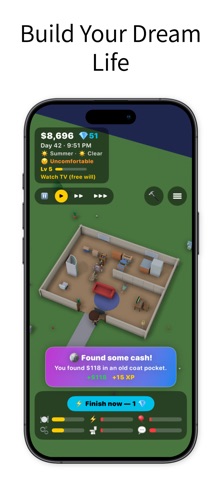
LittleLives' listing describes a 3D life simulation with home building, furniture placement, needs, skills and careers. Players can guide a character directly or use its free-will behavior.

EA's official site presents The Sims FreePlay as a mobile life-simulation game with home building, characters and its own progression and live content.

DecisionLittleLivesThe Sims FreePlay
WorldLittleLives' original 3D life simulationThe Sims mobile life-simulation world
ActivitiesHome design, needs, careers and skills, per listingHome building and Sim-focused progression
Best reason to tryThe particular LittleLives sandbox and controlsEA's established Sims setting and content

Try the building controls and the rhythm of daily play before comparing decorative screenshots. These are separate games with different systems; furniture plans and progression advice are not interchangeable.

Comparison based on current official descriptions, not hands-on testing of the competing product. Prices, subscription eligibility and feature availability can change.
Life-sim room layout planner

A starter home works better when furniture has a place and movement still has room. Sketch a room with a grid, drag furniture into position and export the layout. This is a planning sandbox, so you can test an arrangement before rebuilding in a game.

Drag blocks, select a block to rotate or remove it, and use keyboard arrows for movement. The layout is a sketch rather than a verified in-game floor plan.

Inputs are processed in this page. Nothing is submitted to the app or a business. Download a result to keep it; this page does not automatically save your work.

Put the idea into practice

What to keep in mind

The web plan does not import into LittleLives and does not know the game's furniture prices, dimensions or collision rules. Grid units are your own planning scale; verify the arrangement in Build Mode.

Explore LittleLives

Life-sim room layout planner

A starter home works better when furniture has a place and movement still has room. Sketch a room with a grid, drag furniture into position and export the layout. This is a planning sandbox, so you can test an arrangement before rebuilding in a game.

Open this tool

Plan a starter home before buying furniture

A starter home plan is a way to focus your resources. Sketch the core activities, test access in the game and expand only when you know what the next item will improve.

Read this guide

LittleLives vs The Sims FreePlay

Try the building controls and the rhythm of daily play before comparing decorative screenshots. These are separate games with different systems; furniture plans and progression advice are not interchangeable.

Read the comparison

Visit the LittleLives library

Take the next step
with LittleLives.

LittleLives' listing describes a 3D life simulation with home building, furniture placement, needs, skills and careers. Players can guide a character directly or use its free-will behavior.

View LittleLives on the App Store

The current listing requires iOS 17.0 or later. Some features have additional device requirements. Check the listing and purchase screen for current availability and terms.