Choose what the room needs to do
Decide whether the space is mainly for sleeping, cooking or socializing. A starter room does not need every possible activity at once.
A starter home works better when furniture has a place and movement still has room. Sketch a room with a grid, drag furniture into position and export the layout. This is a planning sandbox, so you can test an arrangement before rebuilding in a game.
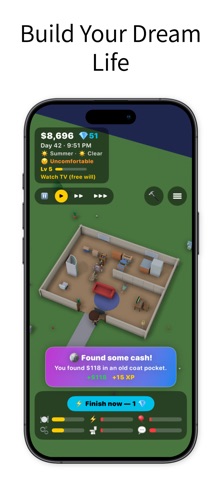

A starter home works better when furniture has a place and movement still has room. Sketch a room with a grid, drag furniture into position and export the layout. This is a planning sandbox, so you can test an arrangement before rebuilding in a game.
Drag blocks, select a block to rotate or remove it, and use keyboard arrows for movement. The layout is a sketch rather than a verified in-game floor plan.
Inputs are processed in this page. Nothing is submitted to the app or a business. Download a result to keep it; this page does not automatically save your work.
Decide whether the space is mainly for sleeping, cooking or socializing. A starter room does not need every possible activity at once.
Place larger objects first and keep a visible path between the entrance and the items used frequently. A beautiful layout is frustrating if access is blocked.
Recreate a small version in Build Mode and check the character's actual movement. Adjust the sketch when the game's rules differ.
Add furniture for the next activity or skill you care about. Expanding because there is empty floor space can spend resources without improving play.
Start with a bed, a table and one leisure area, leaving a continuous route through the room. Move the table in the sketch before committing to a larger renovation in the game.
LittleLives' listing describes a 3D life simulation with home building, furniture placement, needs, skills and careers. Players can guide a character directly or use its free-will behavior.
The web plan does not import into LittleLives and does not know the game's furniture prices, dimensions or collision rules. Grid units are your own planning scale; verify the arrangement in Build Mode.
The web plan does not import into LittleLives and does not know the game's furniture prices, dimensions or collision rules. Grid units are your own planning scale; verify the arrangement in Build Mode.
LittleLivesA starter home works better when furniture has a place and movement still has room. Sketch a room with a grid, drag furniture into position and export the layout. This is a planning sandbox, so you can test an arrangement before rebuilding in a game.
Open this toolA starter home plan is a way to focus your resources. Sketch the core activities, test access in the game and expand only when you know what the next item will improve.
Read this guideTry the building controls and the rhythm of daily play before comparing decorative screenshots. These are separate games with different systems; furniture plans and progression advice are not interchangeable.
Read the comparisonLittleLives' listing describes a 3D life simulation with home building, furniture placement, needs, skills and careers. Players can guide a character directly or use its free-will behavior.
View LittleLives on the App StoreThe current listing requires iOS 17.0 or later. Some features have additional device requirements. Check the listing and purchase screen for current availability and terms.