Script → scene
A parser can recognize screenplay structure. Confirm the imported headings and character cues against the actual revision before trusting downstream records.
StudioBinder, Movie Magic Scheduling, Celtx and Storyflow connect pre-production differently. Choose around the script format, the production records and the handoff your team needs.
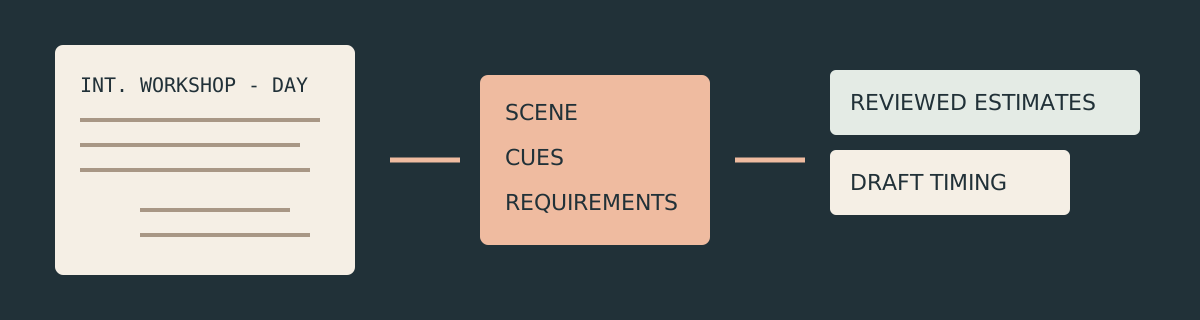
A parser can recognize screenplay structure. Confirm the imported headings and character cues against the actual revision before trusting downstream records.
Speaking cues are only part of a breakdown. Add silent performers, props, equipment and production needs that do not appear as dialogue headings.
Enter reviewed timing and availability. A script page count or a neatly organized stripboard does not establish how long the crew needs.
This comparison is based on current primary product material. It does not claim a commercial-product benchmark, a tested import success rate or measured production savings.
StudioBinder's current script-breakdown page describes importing PDF, Final Draft, Fountain and TXT screenplays, selecting text to tag elements, and syncing with the script, stripboards, shot lists and call sheets. Its elements tutorial describes customizable categories and sharing an elements list as PDF, CSV or within a project.
That documented chain is useful when several departments need to discuss the same element inventory. Decide how you will name a prop, character or set before tagging it repeatedly, and confirm which revision is authoritative when the script changes.
Choose this workflow when the crew's handoff needs to connect tagged elements to the broader production records. Validate your representative script in the actual product: a list of supported formats does not prove every exported or scanned screenplay imports cleanly. Check current account access separately.
StudioBinder's current breakdown workflow · Elements and export tutorialEntertainment Partners' current support material explicitly covers MMS 10. It describes native .fdx import carrying scene headers and speaking characters, or .sex import carrying tagged elements. It also distinguishes a red flag for an unavailable resource from a conflict for an element double-booked across boards.
This matters for productions whose scheduling decisions depend on resources across units. A breakdown imported from speaking cues still requires review; an imported element name is not a confirmed performer or shooting location.
The current guide also describes shared schedules for licensed users on MMS 10.11 or later. Do not rely on an MMS 6-era collaboration assumption when evaluating the current product. Choose this route when structured production scheduling and its documented conflict mechanisms match your needs; test your actual production file and permissions before relying on them.
Current MMS 10 import, collaboration and conflict documentationCeltx's current breakdown guide explains tagging script text or adding an asset that is not represented in the text. Assets feed its Catalog, and breakdown information appears in scheduling and reports. Its schedule guide describes scene strips that update from script headings and editable estimated filming durations.
A useful detail for revision control is that removing a tag and removing the associated asset are separate actions. Review the actual inventory after a script change instead of assuming deleted highlighting removed a production requirement. The guide also warns that imported formatting can create automatic-character false positives.
Choose this workflow when you want the script, breakdown and stripboard to share production records. Give the scene a reviewed estimate and review day boundaries, rather than treating automatic population as a final schedule.
Celtx breakdown documentation · Current stripboard and duration guideStoryflow's current film-production-management page describes a canvas connecting the production plan, breakdown, schedule, documents and crew context. Its pre-production template brings the brief, script, shot list and moodboard into a visual hub. These are vendor-described workflows, not independent outcome measurements.
Choose a canvas when the production discussion needs the reference frame, the script moment and the open decision together. Put a stable scene ID beside the requirement so someone can trace it back to the script rather than relying on memory.
Do not infer MMS-style cross-board conflict checking, tagged-file import parity or operational availability validation from a visual layout. Confirm those requirements in the actual product. A board can make the plan easier to discuss while a separate production record remains authoritative for scheduling.
Storyflow's current production overviewThe script tells you what happens. The breakdown makes the requirements reviewable.
Confirm scene headings and character cues. A structural parser recognizes syntax; it does not interpret every implied production requirement.
Review what the action needs, including people or equipment without speaking cues. Keep unresolved requirements visible.
Enter setup and capture estimates reviewed by the production team. Keep moves and breaks explicit in the eventual shoot-day plan.
into a reviewed scene worksheet.Fountain-js parses real screenplay structure. This tool extracts scene headings and literal speaking cues, then lets you enter requirements and timing. It does not use a trained model, infer props from prose or claim a complete production breakdown.
Use blank lines around headings such as INT. WORKSHOP - DAY and uppercase speaking cues above dialogue. .fountain and .txt are supported; PDF and FDX are not. This is structural parsing, not OCR. Read the Fountain syntax guide.
Scene IDs are ordinal IDs assigned during parsing. Parse again only after exporting reviewed work: the worksheet is rebuilt. Character cues are preserved literally; aliases and non-speaking cast require your review.
Setup and capture estimates start blank so you supply reviewed assumptions. One editable transition allowance is inserted between every scene, even in the same setting. The fixed-order, same-local-day timing draft excludes breaks and availability and cannot cross midnight. Use it to review scope, then build a complete operational day plan.
JSON includes the screenplay and reviewed scene inputs. Restoration parses the saved script and recomputes the schedule. CSV and PDF carry the actual order, cues, requirements, timing and warnings. Export before closing: this page does not automatically save your work.
A silent character may need a cast entry even when the parser finds no speaking cue.
Use the worksheet as a review handoff: trace each scene to its heading, record what still needs confirmation, and move the agreed requirements into your chosen production system. Keep the script revision and schedule revision distinct so a changed line does not silently become an outdated shoot plan.
No. This worksheet extracts Fountain scene headings and speaking character cues. Add non-speaking performers, props, equipment, practical locations and other requirements after reviewing the script with the production team.
No. It accepts Fountain text pasted into the editor or uploaded as .fountain or .txt. The compared commercial tools have their own documented import formats, which must be checked separately.