A month of videos.
One clear handoff.

Notion suits a shared brief database. ClickUp adds task attachment proofing with timestamped video comments. Trello keeps links and files on approachable cards. Storyflow describes an AI-assisted planning canvas. Choose the missing part of your creator/editor workflow before choosing another app.

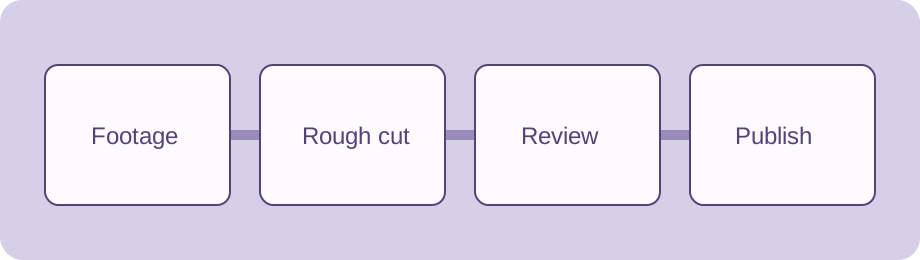
Footage, rough cut, review and publication aligned on a video timeline

The brief and the review are different jobs.

A monthly video plan needs a useful idea, source footage, an editing request and a decision on the exact cut. These recommendations follow documented workflows; we did not run vendor performance tests. Prices and current account eligibility are not verified here.

Notion: briefs that stay with the video

Notion boards group database pages by status, assignee and other properties, with filters and configurable properties. Keep one page per video containing its hook, sources, owner and handoff dates.

Choose it when: your editor needs context that is scattered across messages. A structured brief database can carry the whole month.

Check: make the exact cut version and review decision explicit. A board status is not timestamped proofing or verified publication.

Official board documentation

ClickUp: feedback attached to the cut

ClickUp Proofing supports comments on attached images, videos and PDFs. Video comments include timestamps and appear on the playback bar; comments can be assigned, replied to and resolved.

Choose it when: you need actionable review requests in a task workflow, tied to where a change occurs in the video.

Check: its documentation excludes cloud-storage attachments and describes plan-dependent usage. Do not assume a linked Drive file is proofable or that your plan has unlimited use.

Official current Proofing documentation

Trello: a visible card for each handoff

Trello cards accept file attachments and links. The official guide covers attachment previews and downloads. Put the brief, current cut and reference links on the same card.

Choose it when: a creator and one editor need a straightforward shared queue. Agree on list meanings and the location of the current cut.

Check: external file access is still your responsibility. An attached link and its filename alone do not establish a review decision or the right version.

Official attachment documentation

Storyflow: direction before assignment

Storyflow describes editable AI-generated pillars, ideas and schedules, plus a YouTube plan with hooks, outlines and shot lists. It offers a planning board with references and a view-only or PDF handoff.

Choose it when: the month’s direction is the missing ingredient. Refine the proposed topics, then convert selected ideas into footage and editing responsibilities.

Check: these are vendor-described planning capabilities, not evidence of timestamped proofing, approved cuts or connected YouTube publishing.

Official planner description
A plan your editor can act on.

Creative direction

Write the audience task, the hook and the promised payoff. Include source references and the final output format so an editor does not have to infer the whole idea.

Footage handoff

Record the asset location and the relevant cut version. “Assets folder to be shared” is a demonstration placeholder, not an accessible media package.

Review agreement

Name the reviewer and the delivery date for consolidated feedback. Plan the review window before announcing the publication date.

Monthly editor handoff planner

Luxon works backward from each publication date using your calendar-day lead times. Decimal checks planned editing effort against your monthly available hours. JSZip packages each video’s brief and the complete schedule into a real downloadable archive.

Four fictional videos demonstrate the workflow. All topics, hours, dates, notes and asset references are editable. The dates are planning assumptions, not a promise of publication or a recommended cadence.

All computation and packing stay in this browser; opt-in saves are on this device only. The ZIP contains text briefs and references, not downloaded media or project files. Days are calendar days including weekends. Hours are total remaining editing effort assigned to this plan; simultaneous cuts, holidays, reviewer capacity and daily editor availability are not scheduled. Earlier milestones can fall before the publication month. The tool flags them and weekend dates without silently shifting them. No external account connection, notification, video encoding, AI inference or publishing occurs. Library licenses ship with this page.

Review the plan before sharing it.

Capacity is a conversation

If assigned hours exceed the editor’s available hours, reduce scope, renegotiate the month or move a video. A monthly sum cannot prove that the hours fit before any individual due date.

Make the version unambiguous

Use a specific source or cut reference and consolidated notes. Replacing a file behind an old link can invalidate a review record; agree how versions are named and frozen.

Keep approval human

Confirm the facts, rights, captions, accessibility and final cut before release. A generated archive carries your instructions; it does not perform those checks.

Can we use this with any of the four tools?

Yes. Copy the brief into a database page or task, or attach the ZIP and CSV where your team already works. This does not automatically import into or sync with a vendor.

Does the ZIP contain footage?

No. It contains one Markdown brief per video, the calculated schedule CSV and the complete editable JSON. Asset references remain text. You must grant your editor access separately.

What if publication dates change?

Update the individual date to recalculate all milestones. Changing the month validates existing dates; it does not silently move videos. Reset intentionally loads the demonstration for the selected month.

Give the next cut
a clear starting point.

Build and export the month’s handoff
Organize your video ideas and editor handoffs with Super