Choose your read-aloud workflow

Try the same paragraph in each workflow and judge pronunciation, controls and how you return to saved material. Check current plans directly; old competitor prices or reviews are not a reliable substitute for today's purchase screen.

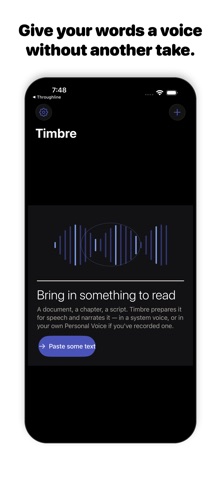
Timbre App Store screenshot
Timbre app icon

Timbre vs Speechify for read-aloud work

Timbre's listing describes read-aloud work, text preparation, local Apple voices and Apple Personal Voice narration when set up on the device. It also offers online studio voices with a plan allowance.

Speechify's official text-to-speech page describes online reading, voice selection, playback speed and document upload. Its broader product range includes mobile and browser readers.

DecisionTimbreSpeechify
Workflow emphasisiPhone narration with local and studio voice optionsRead-aloud tools across multiple platforms
Local voice optionApple voices and configured Personal Voice, per listingCheck the current platform and voice documentation
Best reason to tryAn iPhone-centered narration workflowA reading workflow spanning devices and formats

Try the same paragraph in each workflow and judge pronunciation, controls and how you return to saved material. Check current plans directly; old competitor prices or reviews are not a reliable substitute for today's purchase screen.

Comparison based on current official descriptions, not hands-on testing of the competing product. Prices, subscription eligibility and feature availability can change.
Read-aloud and narration timing tool

Listening catches missing words and awkward phrasing that silent reading can skip. Paste a script, estimate its spoken length and preview it with a voice available in your browser. The timing estimate stays visible so you can compare it with a real read.

Duration is word count divided by the words-per-minute rate you choose. Names, pauses and emphasis change real delivery time. Browser speech support and voice availability vary.

Inputs are processed in this page. Nothing is submitted to the app or a business. Download a result to keep it; this page does not automatically save your work.

Put the idea into practice

What to keep in mind

Browser speech is a preview using the voices exposed by your browser and operating system. It is not Timbre's studio narration or a guarantee of Personal Voice availability. This page does not record or export an audio file.

Explore Timbre

Read-aloud and narration timing tool

Listening catches missing words and awkward phrasing that silent reading can skip. Paste a script, estimate its spoken length and preview it with a voice available in your browser. The timing estimate stays visible so you can compare it with a real read.

Open this tool

Proofread a script by listening

Read-aloud proofreading is a revision loop: listen, mark one problem, rewrite it and listen again. The browser preview is useful for catching language problems before moving into the iPhone app for narration.

Read this guide

Timbre vs Speechify for read-aloud work

Try the same paragraph in each workflow and judge pronunciation, controls and how you return to saved material. Check current plans directly; old competitor prices or reviews are not a reliable substitute for today's purchase screen.

Read the comparison

Visit the Timbre library

Take the next step
with Timbre.

Timbre's listing describes read-aloud work, text preparation, local Apple voices and Apple Personal Voice narration when set up on the device. It also offers online studio voices with a plan allowance.

View Timbre on the App Store

The current listing requires iOS 26.0 or later. Some features have additional device requirements. Check the listing and purchase screen for current availability and terms.