Paste only the spoken material
Remove production notes that should not be narrated, but keep headings or cues a listener actually needs to hear.
Listening catches missing words and awkward phrasing that silent reading can skip. Paste a script, estimate its spoken length and preview it with a voice available in your browser. The timing estimate stays visible so you can compare it with a real read.

Listening catches missing words and awkward phrasing that silent reading can skip. Paste a script, estimate its spoken length and preview it with a voice available in your browser. The timing estimate stays visible so you can compare it with a real read.
Duration is word count divided by the words-per-minute rate you choose. Names, pauses and emphasis change real delivery time. Browser speech support and voice availability vary.
Inputs are processed in this page. Nothing is submitted to the app or a business. Download a result to keep it; this page does not automatically save your work.
Remove production notes that should not be narrated, but keep headings or cues a listener actually needs to hear.
Use a pace you can reproduce. A dense instructional passage usually needs more breathing room than a short conversational introduction.
Stop when a pronoun loses its subject, an abbreviation sounds wrong, or two clauses collide. Change the text, then listen to the same passage again.
Record an actual rehearsal before promising a duration. A calculated estimate cannot account for pauses, audience reaction or pronunciation.
A 600-word script at an entered rate of 150 words per minute estimates four minutes. If the rehearsal takes five, use the measured pace to revise the estimate rather than rushing the narration.
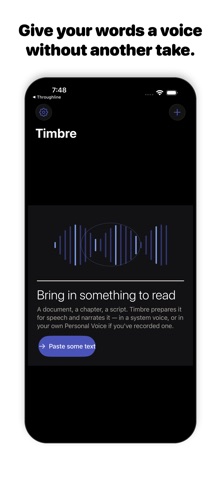
Timbre's listing describes read-aloud work, text preparation, local Apple voices and Apple Personal Voice narration when set up on the device. It also offers online studio voices with a plan allowance.
Browser speech is a preview using the voices exposed by your browser and operating system. It is not Timbre's studio narration or a guarantee of Personal Voice availability. This page does not record or export an audio file.
Browser speech is a preview using the voices exposed by your browser and operating system. It is not Timbre's studio narration or a guarantee of Personal Voice availability. This page does not record or export an audio file.
TimbreListening catches missing words and awkward phrasing that silent reading can skip. Paste a script, estimate its spoken length and preview it with a voice available in your browser. The timing estimate stays visible so you can compare it with a real read.
Open this toolRead-aloud proofreading is a revision loop: listen, mark one problem, rewrite it and listen again. The browser preview is useful for catching language problems before moving into the iPhone app for narration.
Read this guideTry the same paragraph in each workflow and judge pronunciation, controls and how you return to saved material. Check current plans directly; old competitor prices or reviews are not a reliable substitute for today's purchase screen.
Read the comparisonTimbre's listing describes read-aloud work, text preparation, local Apple voices and Apple Personal Voice narration when set up on the device. It also offers online studio voices with a plan allowance.
View Timbre on the App StoreThe current listing requires iOS 26.0 or later. Some features have additional device requirements. Check the listing and purchase screen for current availability and terms.