Clear steps.
Accountable handoffs.

For agency SOPs, choose Notion when page ownership and review matter, Confluence when repeatable page templates fit your knowledge base, or Scribe when your procedure needs an editable walkthrough. A tool helps organize instructions; your team still needs to validate the process.

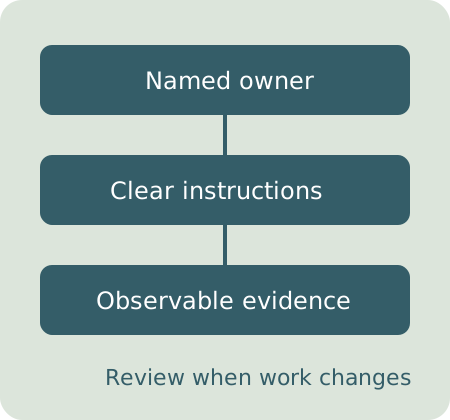
Original diagram showing owner, instructions and evidence connected to a review cycle

Choose for the maintenance job

This is a focused editorial shortlist based on official documentation. It does not claim independent product testing, measured time savings or a universal ranking.

Notion

Notion’s wiki documentation describes page owners and verified pages. Verification can expire so the owner is prompted to revisit the information.

Best-fit question: can your agency maintain a central page with a named owner and recurring review?

Check which verification features your actual plan supports and who can edit, view and share the page before storing client material.

Official wiki and verification guide

Confluence

Confluence Cloud lets you create a page, live doc or blog post from a template. Its documentation also explains that switching templates creates a new item rather than carrying over entered content.

Best-fit question: will shared structures make your agency’s procedure pages easier to maintain?

Agree on a template and page location early. Confirm permissions and your export workflow; a template does not ensure that the instructions are correct.

Official template workflow

Scribe

Scribe’s official editing walkthrough covers changing titles and descriptions, adding steps, formatting text and bulk editing. It is useful when a procedure should be presented as a step-by-step guide.

Best-fit question: does the task need a walkthrough that an operator can follow and revise?

Review captured information before sharing, and check supported capture/export features for your environment and subscription.

Official Scribe editing walkthrough

Prices and plan entitlements are not quoted. Confirm them directly. Recommendations describe workflow fit; use a real agency procedure to evaluate whether the workflow fits your team.

Write an SOP that can be reviewed

Build an owned procedure with steps, completion evidence and a review date. Marked renders your Markdown instructions; DOMPurify sanitizes the preview and exported HTML. This editor does not capture your screen, verify compliance or decide whether a procedure is safe.

Saving is optional and stays in this browser’s local storage until you delete it. No draft upload occurs. A shared browser can expose saved content to another user. Export before changing devices. Completion checkboxes are your working notes, not approval evidence or an audit log.

A procedure needs a reason to exist

Write the decision points, not just a list of clicks.

Define the trigger and finished state

A procedure starts when a specific event occurs. Say what must already be approved, available or complete before the operator begins. End with an observable criterion, such as confirmation of file access, rather than “the project is done.”

Assign ownership at each handoff

Name a role that performs each step. Describe the evidence that demonstrates completion: an approval record, an export or a confirmed message. If an expected input is missing, state the escalation path rather than asking the next operator to guess.

Validate with a representative run

Ask someone who did not write the SOP to perform a representative task. Record where they need clarification and revise the instructions. Screenshots should support the procedure and be replaced when the interface changes. Do not include secrets or personal client information in shared examples.

Review when the workflow changes

Use the review date as a planning reminder and assign one owner to keep the document useful. This studio records the date you choose but does not send reminders. Also review after a changed application, contract requirement, failure or team responsibility.
Keep the document usable

Can I include Markdown?

Yes. Instructions support basic Markdown formatting. Raw HTML and images are removed from the rendered preview; links are disabled to avoid accidentally sending private draft content elsewhere. Exported Markdown preserves your text, so review it before importing into another system.

Is this an execution engine?

No. Steps remain in the order you arrange them. A checked step records your local progress. It does not confirm that the task was performed correctly or enforce dependencies and approvals.

What blocks an export?

Empty titles, owners, review dates, steps, instructions or evidence fields block the draft export. The check identifies missing text, not factual correctness. A complete form can still describe a poor procedure.

Make the next handoff clearer

Start with one recurring agency workflow, assign the owner and walk through it with the person who will use it.

Create a reviewable SOP draft
Keep agency procedures clear and reviewable with Super