Structured records
Tasks need stable IDs, accountable owners and consistent properties. A database view can expose the same records in different arrangements.
Notion and Storyflow organize a visual project in different ways. Start with the same brief, owners and prerequisites—then choose the shape that makes the next decision easier.
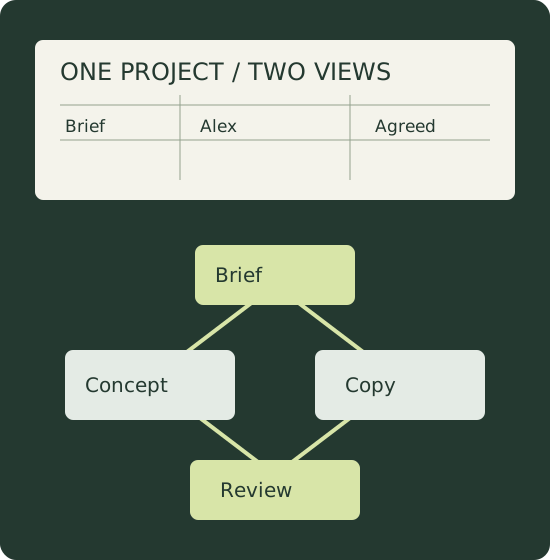
Tasks need stable IDs, accountable owners and consistent properties. A database view can expose the same records in different arrangements.
A reference or draft explains why a task exists. Keep the meaning near the decision without confusing adjacency with a dependency.
A prerequisite must be completed before its successor starts. Name those relationships instead of relying on where cards happen to sit.
The example is fictional. The comparison is grounded in current product documentation, rather than a timed test or a claim that either tool guarantees project success.
Alex owns the brief. Sam develops a visual concept, while Lee drafts the copy. Both depend on an agreed brief. The direction review depends on both drafts, and production depends on that review. The important information is the same wherever it lives: who decides, what is blocked and which reference explains the intended result.
Our example uses five tasks with entered durations of two, three, two, one and four elapsed days. With unlimited parallel capacity and finish-to-start prerequisites, the dependency lower bound is ten elapsed days: the copy draft runs beside the longer concept task. That is a calculation from the fictional inputs, not observed vendor performance or a promised calendar date.
Notion's current dependency guide describes task relationships and three automatic date-shift settings: shift only on overlap, maintain the gap between items, or do not shift automatically. It also describes a weekend-avoidance setting. Those choices matter when a brief moves: decide what the downstream dates should mean before expecting them to update.
For this campaign, keep one record per task with an owner and an explicit predecessor. The brief, concept and copy can be separate records; the review connects to both drafts. Use the actual dependency property for the scheduling relationship, rather than a plain-text note that someone must interpret later.
Notion's relations documentation explains how records in databases can link and how rollups aggregate related properties. That is useful when campaign tasks need to connect to a larger project record. Design the relationship before building the summary; a rollup only means what its selected relation and calculation mean.
There is a handoff boundary: Notion's guide says relation properties export as text URLs in CSV and that re-importing the CSV does not re-establish those relations. Preserve IDs and an edge list when transferring work, then reconstruct and verify the relationships in the destination.
Notion: current dependencies and date shifting · Notion: current relations, rollups and CSV limitationStoryflow's current visual-project-planning page describes phase tables with owners, dates and status, plus Kanban tickets, arranged beside references, drafts and documents on a canvas. It also describes board-aware assistance that proposes changes for the user to review. These are vendor-described capabilities, not independently measured gains.
For the same campaign, put the brief beside the concept references and the copy draft. Keep each phase's owner and state explicit, and place the review decision where the team can compare the materials it covers. The visual arrangement can make the intent legible; it should not be treated as proof that a predecessor relationship is enforced.
The current page distinguishes its canvas from relational-database and automation workflows. Do not infer that a drawn connection behaves like Notion's documented date-shifting dependency. If delivery relies on those mechanics, verify the behavior in the actual product or maintain the authoritative dependency record separately.
This guide uses the current planning page rather than an older hierarchy article for contemporary capability claims. It makes no standalone free-plan, pricing or migration promise. Check current account access and the exact export your reviewer needs before adopting either tool.
Storyflow: current visual-project-planning overviewChoose Notion when the team needs dependable record relationships, selected date-shift behavior and summaries built from structured properties. Choose a Storyflow canvas when the review revolves around seeing the plan beside actual creative material. Those recommendations follow the documented workflows; they are not scores.
If the project uses both, name one authoritative task record and link to the visual review material. Keep IDs and owners consistent. When the approved direction changes, update the task record and the reference handoff together instead of assuming one tool changed the other.
A stable ID and a readable name let the same work survive a switch from rows to a canvas. Keep the owner's responsibility explicit.
A reference, brief or decision note explains the intended outcome. Its position on a board should help a reviewer understand the task.
A predecessor ID is a scheduling relationship. Preserve it separately so a handoff can recreate and validate the connection.
Enter your tasks once. Dagre computes the directed graph layout, and its bundled Graphlib checks cycles and ordering. The lower bound assumes unlimited parallel work; it does not simulate either commercial product.
Headers: id, name, owner, duration_days, depends_on, status. Separate multiple prerequisites with semicolons; quote names containing commas. Durations are whole elapsed days, with zero allowed for milestones. Status is descriptive and does not remove a task from the calculation.
Assumptions: finish-to-start prerequisites, zero lag, day zero at project start and unlimited parallel capacity. No working calendar, resource leveling or date-shift policy is applied. Zero slack identifies critical tasks under these assumptions; it does not predict the real delivery date.
| ID | Task | Owner | Duration | Prerequisites | Status | Earliest start | Earliest finish | Slack |
|---|
Select a node with a click or keyboard to inspect all upstream prerequisites. JSON preserves inputs and the computed model; restore recomputes it. CSV preserves prerequisite IDs as text, so recreate destination-specific relations. SVG contains the actual calculated layout. Export before closing: this page does not automatically save your project.
Keep the approved brief ID on both the visual board and the task database.
Use the diagram to discuss the relationships, the table to check accountable owners, and the exported input record to preserve what was agreed. Rebuild when the project changes, then review the assumptions before turning this model into dates or client promises.
No. The export preserves task IDs and prerequisite IDs as text. Notion's documentation says exported relation URLs cannot be re-imported to re-establish database relations. Recreate and verify destination relationships separately.
No. It is a lower bound from finish-to-start prerequisites, entered durations and unlimited parallel capacity. It excludes calendar rules, resource conflicts, lag and unconfirmed work, so it requires a separate delivery review.