Explore the relationships
Move references and ideas to discover connections. Position can communicate a relationship before you know its name.
Notion and visual project planning
Notion is useful when visual means status, dates and browsable records. A canvas adds something different: room to arrange uncertain ideas. Explore both before moving your project.
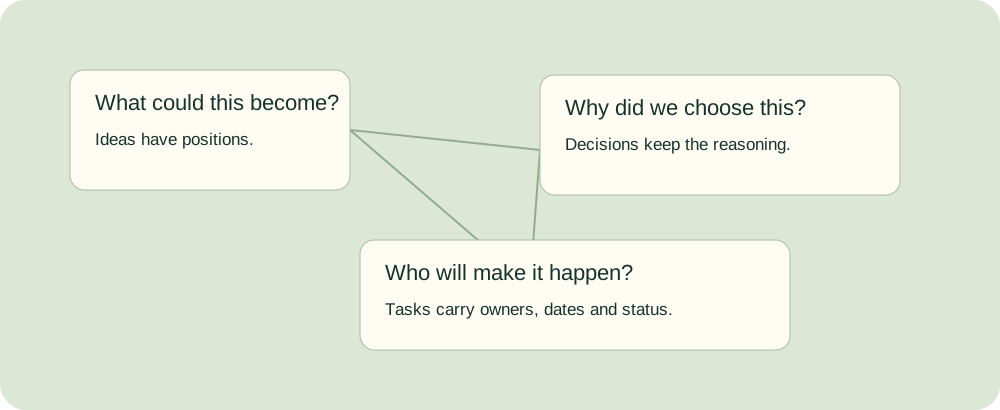
Move references and ideas to discover connections. Position can communicate a relationship before you know its name.
Preserve the chosen route, rejected option, evidence and owner. An arrangement cannot explain itself six months later.
Once work is promised, give it a status, owner and date. Moving a card in a status board changes a field, not its spatial meaning.
Drag a record on the spatial map without changing its status. Edit a task’s status without moving its spatial coordinates. Keep the complete brief, rationale and handoff notes with the same record.
This is a local planning exercise, not a Notion integration or AI classifier. You choose every record’s meaning, type and status. Overdue means an unfinished task has a due date before the entered review date. Unowned means an unfinished task has no owner. Ideas and decisions are not automatically task commitments.
Drag cards to arrange them; drag empty space to pan. Use buttons to zoom; Fit map shows the overview and Focus selected makes one card readable. Select a card or its record button to read and edit all its content. Keyboard-accessible X/Y fields provide an alternative to dragging.
Only records marked Task appear here. Status changes update the same source record.
JSON restores the complete brief, records and map positions. CSV and Markdown retain full text and source links. SVG is a visual map with abbreviated card text; download JSON or Markdown for the complete written record. Browser storage can be cleared; keep a portable backup.
Move an idea closer to a reference and its interpretation may change. Mark a task approved and its workflow changes. A good planning system keeps those choices connected without pretending they are the same choice.
You need searchable documents behind records, filtered views, owners and dates. A gallery can browse visual work without becoming a free-position moodboard.
You need to compose references, cluster feedback, sketch relationships or facilitate a discussion while the structure is still uncertain.
Explore on a surface, then preserve the reasoning and commitments. Name the handoff owner and review the record when a decision changes.
Notion is a useful visual planning tool for documents attached to work, status boards, chronological plans and browsable libraries. It is a different kind of surface from a free-position whiteboard. Choose it when the project needs a reliable record of what is happening and why. Add a canvas when arranging references, sketching relationships or exploring uncertain options is part of the work.
The distinction is practical. A status board generates its arrangement from a property: moving a task into Review changes its status. On a spatial board, moving an image next to a concept may change how someone interprets the concept without changing any task field. Neither operation is more serious or more creative. They answer different questions.
A gallery is also useful visual planning. A designer can browse current files, a producer can inspect shots, and an editor can see thumbnail-led records. It is not necessary to reject a gallery because it lacks free positioning. It becomes insufficient when the composition itself matters: overlaps, relative scale, arrows, informal clusters or seeing a large system from a distance.
Before replacing Notion, identify a concrete failure. Is the team losing the reasoning behind a decision, missing delivery dates, unable to compare references, or struggling to facilitate a workshop? Unclear ownership, reopened decisions and commitments made without capacity review can follow you into any new tool. If nobody maintains the existing workspace, reduce its demands and name an owner before buying another one.
Notion’s board view groups database pages by a property such as status, assignee or priority. Several views can represent the same underlying records. Each record opens into a page where the brief, reasoning and source links can remain with the work. This is valuable when a task has more context than a short card description.
Its timeline plots records with dates. Sub-items and dependencies add structure, and dependency settings can shift dates when they overlap, maintain the interval between items, or leave dates unchanged. Review those settings deliberately; a dependency arrow and an automatic reschedule are different behaviours.
Use a calendar for date-led events, a table for bulk editing, a list for a quick scan, and a gallery when the image preview matters. Current database views also include charts, maps, forms, feeds and dashboards. A map view places geographic records; it should not be mistaken for a free-position canvas for arbitrary ideas.
Notion’s block model allows text, images and other content to be composed into pages. Columns and embedded boards can improve a layout, but do not make native blocks into freely placed, overlapping objects with canvas-style pan and zoom. The retrieved native documentation does not establish a general infinite whiteboard. An embedded canvas retains its own product’s permissions, maintenance and capabilities.
Avoid describing Notion AI as only a writing assistant. Current Notion Agent documentation describes creating and editing pages, databases, views and properties, including relations. It can help draft a structured launch plan. That is useful planning work even though it does not establish free-position visual composition. Review the proposed owners, dates, relationships and source assumptions before accepting the result.
Searchable text, filters and relations help with retrieval, but retrieval still depends on recording the decision. A beautiful page with no rationale cannot answer why a route was rejected. A database with unused properties can look authoritative while hiding stale information. Design the system around questions the team actually asks.
Different stages benefit from different representations. You can keep both in one product or maintain a deliberate handoff between products. The important boundary is who updates the written record when a spatial decision becomes a commitment.
| Stage | Useful representation | A practical output |
|---|---|---|
| Brief and discovery | Written brief plus references arranged where useful | A shared goal, constraints, sources and open questions |
| Concept exploration | Spatial alternatives with short rationale notes | Distinct routes and the evidence that supports each |
| Planning | Tasks and dates, with links to the chosen route | Deliverables, owner, approval point and timing |
| Delivery | Structured status, dates and dependency checks | A current record of what is done, waiting or blocked |
| Client review | Visual work beside a written decision | Explicit approval scope, requested changes and next owner |
| Retrospective | Clustering plus a written action record | Separate causes, repeated concerns and agreed changes |
| Archive | Searchable decisions and final files | Enough context for another person to understand the project later |
Use this ten-question worksheet rather than a universal vendor score. Does the project begin with visual references? Will a client inspect the plan itself? Is task volume becoming difficult to maintain? Do dependency chains cause downstream changes? Must decisions be retrieved later? Is the brief long enough to need substantial writing? Who will maintain the system? Is the route still uncertain? Does the work repeat on a schedule? Will the plan be presented live?
Write which representation helps each answer and which existing system already supports it. Do not turn an arbitrary task count, team size or point threshold into proof that a product is right. A four-person project can have difficult sequencing; a large team can run a simple workshop. If you want weighted ratings, state your own criteria and evidence, then test how changing the weights changes the choice. This guide does not invent benchmark scores for vendors.
If most failures concern references and undecided relationships, try a canvas first. If they concern owners, recurring commitments and retrieval, improve the tracker first. If both are material, evaluate a combined workspace or a named two-tool handoff. The latter can work well; it needs a version, owner and update rule rather than a casual link.
The comparison below draws on current official capabilities. It does not claim hands-on commercial tests, universal reliability rankings or equal feature access across plans. A useful trial should use your own reference set, written brief, a changed deadline and the export the next person actually needs.
| Product | A useful fit | Check before choosing |
|---|---|---|
| Notion | Documents, wiki, relational records and multiple structured views | Native pages and galleries are not arbitrary free-position whiteboards. Check view, permission and AI access for the actual plan. |
| Storyflow | Creative-project references, documents and typed plan objects on one canvas | Its current visual-planning page identifies lighter relational/automation coverage. Separate paid early-access signup from free invited collaboration. |
| Miro | Spatial workshops, diagrams and mixed formats on a shared canvas | Current Docs, Tables and Timeline broaden it beyond sticky notes. Dependency availability and automatic date changes have specific limits. |
| FigJam | Collaborative ideation alongside a Figma design workflow | Verify the required seat, AI credits and handoff to task delivery; shared design context does not automatically provide a full tracker. |
| ClickUp | Task delivery, Docs and a whiteboard connected to real work | Tasks and Docs can sit and be edited on a Whiteboard, but the documented whiteboard export excludes those objects. Test the full handoff. |
| Milanote | Image-led boards, creative briefs and presentation of visual direction | It has to-do lists and assignment workflows; do not describe it as having no task capability. Check whether its lighter tracking is enough. |
| Asana | Dependency-led delivery, timelines and formal review workflows | Check plan access to Gantt, approvals and workload, and preserve the surrounding visual brief and rationale. |
| Linear | Software issues, cycles, projects and related documents | It supports substantial documents and project context; it remains an issue/product-work model rather than a general spatial moodboard. |
| Trello | A readily understood card-based workflow | Native Calendar and other extended views have paid-tier requirements; Calendar Power-Up and Planner are separate workflows. |
Notion: choose it when the document behind a record, linked project/task data and filtered questions are central. A board view can be grouped differently without copying the project. The practical loss is free-position composition, not the absence of visual planning or AI-generated structure.
Storyflow: its current visual-planning workflow describes documents, references, Kanban tickets and typed tables on a project canvas, with AI proposals reviewed by the user. It also describes view-only client links and export. Check the required access and delivery needs; canvas tracking should not be assumed equivalent to a relational portfolio or a dependency scheduler. Its pricing distinguishes paid early access, upcoming standalone free access and available invited collaboration.
Miro: current Docs are editable on the canvas, support manual or AI-assisted creation, can import Word content and export PDF or Markdown. Describing Miro as unable to hold useful writing is outdated. Current Timeline and Tables support structured records and dependencies. Dependencies are documented for Business and Enterprise, with beta limitations and no automatic date adjustment. Choose Miro for a real facilitation or mapping need and test the weeks after the workshop too.
FigJam: its AI documentation covers generating boards and diagrams and working with sticky-note content. Seat and paid-plan access matter. It is a sensible first trial for a team already sharing Figma files, but the delivery tracker and archive still need an explicit home. Review the seat structure rather than assuming an existing view-only seat provides every editing capability.
ClickUp: its Whiteboard documentation describes adding and editing real tasks and Docs on the surface, and converting shapes or notes into tasks. This is a substantive combined workflow, not just a decorative canvas. The same page warns that tasks and Docs are excluded from the Whiteboard export. Check role, plan limits, setup effort and the recipient’s actual deliverable.
Milanote: to-do lists and collaboration complement image-led boards. Use it when the visual arrangement and creative direction are the main deliverable, and verify the needed task details instead of treating a checklist as a dependency planner. Its export documentation includes visual and text formats plus packaged files; test that the exported board remains legible.
Asana: current plans place timeline/Gantt on Starter and approvals and workload on Advanced. Choose it when sequencing, ownership and formal delivery controls are the main constraint. Link the approved brief and decision record deliberately; a task dependency does not explain a creative route by itself.
Linear: current projects, cycles and documents connect issues with longer context. Documents support collaborative editing, comments and version history. It can be an effective product-delivery home even when launch messaging is explored elsewhere. A nonsoftware team should test whether its work fits the issue model rather than choosing it for interface polish alone.
Trello: choose a simple card workflow when that is enough. Native Calendar is distinct from the Calendar Power-Up and Planner. Each answers a different scheduling question. Keep longer reasoning linked to the card and check which dates, views and guest rules you need.
The following USD annual-billing equivalents were checked on official pricing pages for this guide. They are reference points, not a quote: confirm currency, tax, billing term, seat minimums, limits and current access before buying. A monthly equivalent on an annual plan generally means an annual commitment rather than a monthly charge.
| Product and reference plan | Listed annual-billing monthly equivalent | Important billing distinction |
|---|---|---|
| Notion Plus | $10 per member | Business is $20; Free/Plus AI trial differs from Business/Enterprise Agent allowance. |
| Storyflow Plus | $7.99 | Standalone early access is paid; invited collaboration is a separate route with its own access. |
| Miro Starter | $8 per member | Free keeps three editable boards; tier-specific structured features and AI credits matter. |
| Figma Professional Collab | $3 per seat | Check the actual FigJam editing seat and credit access rather than paying for unnecessary Full seats. |
| ClickUp Unlimited | $7 per user | AI usage and higher-view limits need a separate check. |
| Milanote individual | $9.99 | Compare per-person and team offers against the actual user count and free limits. |
| Asana Starter | $10.99 per user | Advanced approval/workload needs may change the plan; Personal currently covers two people. |
| Linear Basic | $10 per user | Check issue/team limits and whether the project belongs in a software workflow. |
| Trello Standard | $5 per user | Native extended views may require Premium even if Standard handles cards well. |
A fictional four-member Notion Plus workspace at the listed annual equivalent is $40 per month, or $480 for twelve months before tax. Five members would be $50 equivalent per month. If all four need Miro Starter as well, the listed equivalent is another $32, making $72 per month or $864 per year before tax. This arithmetic compares that specific two-tool configuration; it is not proof that every guest needs a paid seat or that another combination costs the same.
Free limits can change the practical choice before a paid tier matters. The checked Milanote plan allows 100 notes, images or links and ten file uploads; Linear Free lists two teams and 250 issues; Trello Free lists up to ten collaborators and ten boards per workspace. Notion’s individual Free usage differs from its multi-member block limit, and Figma Starter’s limited access differs from a paid Collab seat. Check whether your trial remains within the actual limit instead of treating every Free label as equivalent.
Separate member, guest, viewer and commenter access. A client viewing an allowed link may not require a full editing seat. A collaborator who needs private boards, administrative controls or AI actions may require more than a guest route. Avoid claiming a one-seat invitation pattern is an equivalent replacement for four fully paid seats unless the actual required capabilities match.
Also price the handoff. Who writes the rationale, copies final decisions, maintains dates and checks access? Count those actions as work, with your own time estimate. There is no measured universal “maintenance tax” supplied here. A second tool can be worthwhile if it solves a real problem and the handoff is maintained; a cheaper single tool can cost more when the required export is incomplete.
This fictional museum identity project runs from Monday 12 October to Sunday 6 December 2026. Inez owns strategy, Maya and Theo own design, and Luca owns client coordination and archive. The example preserves spatial exploration, written reasoning, feedback clustering, task delivery and later retrieval. The times and record counts are planning choices, not performance benchmarks for commercial products.
| Dates | Work and representation | Output and owner |
|---|---|---|
| 12–16 Oct, week 1 | Explore references and four possible territories on a canvas; write the route decision beside them or in a linked document | Inez records why a participation-led direction fits the museum programme. |
| 16 Oct, handoff | Preserve the chosen route, rejected alternative, evidence and review owner | Inez publishes the decision record; Luca checks that the client can access it. |
| 19–30 Oct, weeks 2–3 | Develop three design expressions with rationale and files behind each | Maya coordinates route prototypes; Theo checks the alternatives against the brief. |
| 2–6 Nov, week 4 | Cluster feedback, separate duplicate concerns and write distinct objections | Luca assigns the feedback owner and captures the review outcome. |
| 9–20 Nov, weeks 5–6 | Refine the approved route and track changes through review | Theo maintains current files, status and the rationale for each amendment. |
| 23 Nov–6 Dec, weeks 7–8 | Deliver agreed assets; use dated task records and acceptance notes | Maya packages identity assets by 4 Dec; Luca records acceptance and remaining exceptions. |
| 7 Dec, archive | Keep final files, approvals, rejected routes and decision links | Luca checks the archive can be read without workshop narration. |
| 12 Apr 2027, retrieval check | A new colleague asks why the identity is warm and participation-led | Read Inez’s decision, its evidence and the original reference cluster. |
The loaded tool example contains eight records: two illustrative idea territories, one written route decision and five task commitments. The broader project can include more territories and route documents; the small ledger is intentionally a readable starter. Its review date is 4 November. The prototype task is still in Review with a 30 October due date, so it is overdue. The feedback task is due 6 November but lacks an owner, so it is unowned. These are separate issues, not a vendor score.
Move the Hands-on idea beside the decision and its status does not change. Change the prototype task from Review to Done and its map position does not change; the overdue count becomes zero. Give the feedback task to Luca and the unowned count becomes zero. The workbench makes those distinctions inspectable instead of hiding them behind a recommendation quiz.
In a two-tool implementation, a named person writes the canvas outcome into the tracker and links the correct version. In a combined canvas/document workspace, that person writes it beside the references and keeps the task fields current. Both can pass the April retrieval test. Neither works if the team assumes an old board or a bare status field explains why the route was chosen.
When feedback conflicts, preserve the original wording first. Group related objections without deleting minority concerns, write the distinct decision question, and record the resolution and approver. Do not assume two comments are duplicates because they look similar. Clustering is a thinking aid, not an automatic semantic judgment.
For many teams, one Projects database related to one Tasks database is a useful starting shape. It allows filtered project views and cross-project questions without copying the same work into separate databases. It is a pattern, not a rule against every specialized database: permissions, genuinely different records or a distinct workflow can justify a separate source.
Start with fields that someone will maintain: status, owner, dates and project relation. Add a field when a real recurring question needs it, and decide who keeps it accurate. Keep the brief, reference links, decision thread and acceptance notes in the page body. A field that appears filled but has not been checked can be more misleading than an explicitly missing value.
Name views after their purpose. “Waiting for approval” filters relevant statuses; “Due this week” uses the current date range; “My open work” filters owner and completion state. The underlying records stay shared. A gallery can browse visual deliverables; a timeline can reveal sequencing. Not every project needs every available view.
Create an exception view for unfinished work that is overdue, unowned or missing a required date. Decide what “overdue” and “unfinished” mean for your workflow. The local tool makes those definitions visible and uses an entered review date rather than silently comparing a fictional example to today. An empty exception list is meaningful only if dates, owners and status are actually maintained.
Templates should reduce setup work, not create obligations you do not understand. Remove unused fields, sample records and decorative dashboards. Keep a project-page template with the brief, decision log, useful views and final acceptance record. Try it through a complete milestone before declaring it the studio’s system.
For dependencies, inspect the actual automatic-shifting mode and weekend choice. For an approval, identify the approver and which version is being accepted. For a company wiki, preserve information architecture and permissions, not just a folder of project boards. A project canvas and an organization-wide knowledge base can coexist without one pretending to replace the other.
Embedding Miro in Notion can be a sensible navigation choice: the project page can hold the brief and a nearby board. It does not merge ownership, permissions, search, versions or data models automatically. Test client access to both surfaces, choose where the decision is written and avoid treating an embedded view as a live synchronization promise.
A Notion gallery can be enough for an organized reference library or browsing approved routes. It becomes a poor substitute when you need deliberate overlap, scale or spatial proximity. Columns and toggles can present a small comparison; they are less suitable for an expanding system map. Do not spend hours imitating a canvas when the actual task requires one, but do not dismiss every simple page layout as a failure.
For a canvas-first workflow, begin with the complete brief and constraints, collect sources, arrange uncertain alternatives, write the chosen route, then create deliverables with owners and dates. Share the intended version, run the review and keep affected records current after changes. That sequence applies whether you use Storyflow, Miro, ClickUp or a separate canvas/document pair; each product’s AI, sharing and tracking behaviour still needs its own check.
Move one project before moving the organization. Keep live commitments in their authoritative tracker, copy the discovery brief and key references into the trial surface, then record milestone outcomes deliberately. Notion exports can include database CSV and page Markdown. Imports support multiple formats but have limitations. A portable file is not proof that permissions, comments, relations, automations and all formatting will round-trip.
This workbench uses D3 for a real draggable, zoomable SVG map and Luxon for date checks. The same source record drives the map, task board and full reading view. It does not connect to vendor APIs, infer clusters with AI or synchronize products. Full JSON restores the brief, every field and coordinates. CSV and Markdown retain the full written handoff; SVG preserves a readable visual arrangement with intentionally abbreviated card labels.
Keep a mapping when transferring records: stable ID, title, project, kind, cluster or relationship, rationale, decision, full notes, source link, owner, dates and status. Preserve originals and mark unresolved import differences. A screenshot may explain arrangement but cannot replace the underlying written decision.
| Reader | Main obligation | A useful first trial |
|---|---|---|
| Founder planning a launch | Messaging, chosen route and a deliverable date | Canvas for alternatives; Notion or another tracker for commitments and the company record |
| Design, video or photo studio lead | Client work with references and approvals | A creative canvas/document workflow; test the client view and complete handoff |
| Agency account lead | Concept decisions, revisions and formal approval | Spatial review plus a written decision; consider Asana when approval controls are material |
| Producer | Script/shot decisions, schedule and production documents | A visual planning surface with a dedicated production tool where scheduling detail requires it |
| Product founder with engineers | Backlog, cycles and release scope | Linear or an established engineering tracker; a separate launch surface can hold messaging |
| Operations lead across many projects | Portfolio questions, owners and dependencies | A structured cross-project source; use per-project canvases for exploration when helpful |
| Facilitator | A live session and a maintained outcome | Miro or FigJam, plus an explicit written/action record after the meeting |
If only one tool is possible, prioritize the failure with the largest consequence. A missed formal approval, an inaccessible client board and a lost design rationale are different risks. Test the actual participant roles and export before standardizing. No tool is the universal first choice for every founder or small studio.
Brand trust needs evidence beyond a pricing page. Check documentation, release notes, support, permission controls and the actual trial outcome. Product age does not establish reliability for your workload, and a broad “large databases are slow” claim does not supply a measured limit. Trial a representative volume and record your observed behaviour honestly.
Underrated choices can be modest: a Notion gallery when browsing is enough, Milanote for a clear visual deliverable, a written decision beside the cluster, or keeping the existing tracker while improving discovery. The useful improvement is reducing a specific failure, not changing brands for its own sake.
The general canvas-to-tracker sequence becomes more useful when you know what to inspect in the product. Storyflow’s current visual-planning page describes a brief beside the phases, typed owner/date/status/currency cells, tickets, references and client links. These are published capabilities; this guide does not claim a hands-on commercial account test.
Its detailed planning article says the assistant reads the current board, supports attaching up to five documents and three other boards per message, and provides Undo for a message’s changes. It describes nested boards, inline document comments and document exports to Word/PDF. Verify those limits and exports in your actual account before a consequential handoff.
For the fictional museum project, Inez can start with this request: “Build an identity-project brief from the attached museum programme. Keep the audience assumptions separate from approved facts. Show four possible territories, a decision document, and phases with owner, start, end and status. Leave the client approval date open until Luca confirms it.” After generation, Inez checks the programme references, corrects the roles and removes any invented commitment. Attaching evidence provides context; it does not make every proposal accurate.
The article describes fullscreen presentation through board walls, with stops that can be reordered or hidden, and whole-board image/PDF export. Use that sequence to show the selected route beside rejected alternatives, then inspect the exported text and current files. Its documented tables lack column sorting/filtering; keep a schedule readable or retain structured delivery in the existing tracker. Reorganizing a board and redrafting affected documents are maintenance actions, not automatic synchronization.
At the 16 October handoff, Inez writes: “The participation-led route is selected because it connects the museum programme to making and visiting together. The archival route remains a rejected alternative, not a second approved direction. Luca must confirm the client’s acceptance and record any conditions.” Attach the relevant reference version and approved decision before creating task commitments. This is example copy for a fictional project; the real record needs the actual approver and evidence.
A view-only link and a commenting/editing workflow have different access requirements. Storyflow’s Help Center currently places live multi-editor presence and roles within the Max Team Workspace. The planning article describes collaboration more broadly. Check the specific required plan and participant roles rather than treating those descriptions as an unconditional promise of every feature on every tier.
Before the review, Luca opens the intended link as the intended recipient and checks the current route, readable documents and available response controls. Afterward, the archive keeps the decision, source files and exceptions together. Duplicate or save an appropriate project template only after clearing client-specific material. Keep company-wide retrieval and permissions in their authoritative home; a board export alone does not reproduce the wiki.
Yes. Its board view groups database records by a property such as status, owner or priority. Several views can represent the same records, and each record opens into a page for context.
The retrieved native documentation describes block-based pages and database views rather than a general free-position whiteboard. Embedded canvases retain the capabilities and access rules of their own product.
You can arrange images in pages or browse them in a gallery. Use a spatial canvas when overlap, scale, informal clusters or free positioning are part of the decision.
It depends on the job. Miro and FigJam serve spatial collaboration, Storyflow combines creative material with plan objects, and ClickUp connects a whiteboard to tasks and Docs. Notion remains useful for structured records and writing.
Use tables for editing, boards for grouped states, timelines for chronological work, calendars for dated events and galleries for visual browsing. Choose views around real questions instead of enabling every layout.
They can shorten setup if you understand the underlying records and permissions. Remove fields and dashboards nobody will maintain, then test the template through a milestone.
Rate it against your own requirements and trial evidence. Documents, structured views and retrieval are different criteria from spatial composition; this guide does not provide an invented universal score.
For some project workflows its Docs, Tables and Timeline can cover more than an older whiteboard-only comparison suggests. Test structured delivery, retrieval, permissions and the company wiki needs before replacing either system.
It may be when the required dates and dependencies fit its model. Check dependency shifting settings and the actual downstream changes; explore positioning and messaging separately when they are still uncertain.
Use a representative trial of your records, files, collaborators and devices. Clear ownership and maintained fields matter; neither product maturity nor this guide establishes a universal performance guarantee.
It is a representation that makes goals, relationships, deliverables and commitments easier to inspect. It can be structured from fields, arranged spatially, or combine both with written reasoning.
Both can show dated bars; dependency, rescheduling, critical-path and workload capabilities vary by product and plan. Inspect the actual behaviour rather than relying on the view name.
They can support a deliberate project handoff, with a named person recording outcomes and linking the relevant version. Do not assume a native live sync from this guide; verify any integration you intend to use.
It may hold substantial project documents, but a company wiki also needs retrieval, structure, permissions and cross-project context. Test those needs independently instead of equating one readable board with a knowledge base.
Its current visual-planning documentation describes view-only client links without an account. Check commenting, editing, permissions and the specific shared version separately.
Prioritize the material failure: uncertain visual relationships, lost written context, missed commitments or formal delivery control. Trial the tool with every necessary participant and export before standardizing.
Yes. Current Notion Agent documentation describes creating and editing pages, databases, views and properties. Review the output; AI-generated structure does not establish native free-position composition or automatically correct commitments.
At the checked $10 Plus annual-billing monthly equivalent, five paid members are $50 per month equivalent before tax. Confirm the billing term, required tier, guest roles and current prices.
Start with the next project’s discovery brief and key references while preserving the authoritative tracker. Test the decision handoff and actual exports before attempting a broader migration.
No universal ranking is established here. Compare current access, support, permissions, export, seat rules and your representative trial rather than borrowing an unsupported score.
Choose one current project. Preserve its brief, arrange the uncertain options, then give each real commitment a named owner and date.
Plan the next handoff