Choose a listening workflow

ElevenReader's official site presents read-aloud listening for books, PDFs and articles, with document upload and selectable narration voices.

Timbre App Store screenshot
Timbre app icon

Timbre vs ElevenReader for text listening and narration

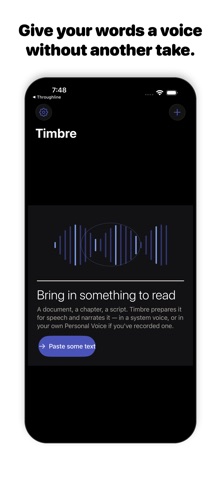
Timbre's listing describes read-aloud work, text preparation, local Apple voices and Apple Personal Voice narration when set up on the device. It also offers online studio voices with a plan allowance.

ElevenReader's official site presents read-aloud listening for books, PDFs and articles, with document upload and selectable narration voices.

DecisionTimbreElevenReader
EmphasisiPhone narration and local Apple voice options, per listingA reading and listening library
Starting pointPrepared text and the app's supported voicesUploaded reading material or supported links
Question to testHow the local or studio voice fits your projectHow the reader handles your documents and listening habits

Use the same passage to test pronunciation and how you resume listening. Timbre's listing describes configured Apple Personal Voice and local Apple voices, which are specific reasons to inspect its device requirements. ElevenReader emphasizes bringing reading material into its listening workflow. Neither the browser segmentation tool nor a feature list proves that a particular voice is available in your region or account.

Comparison based on current official descriptions, not hands-on testing of the competing product. Prices, subscription eligibility and feature availability can change.
Narration script segmentation and timing planner

A long script is easier to rehearse and review in smaller sections. Enter your measured speaking pace and a target segment length to divide the text into ordered word groups. The planner preserves every entered word and reports estimated minutes for each group.

Segmentation is mechanical at word boundaries, so a break can land inside a sentence. Review the transitions yourself. Estimates do not include silence, pronunciation changes or editing time, and no audio is generated by this page.

Inputs are processed in this page. Nothing is submitted to the app or a business. Download a result to keep it; this page does not automatically save your work.

What to keep in mind

Browser speech is a preview using the voices exposed by your browser and operating system. It is not Timbre's studio narration or a guarantee of Personal Voice availability. This page does not record or export an audio file.

Take the next step
with Timbre.

Timbre's listing describes read-aloud work, text preparation, local Apple voices and Apple Personal Voice narration when set up on the device. It also offers online studio voices with a plan allowance.

View Timbre on the App Store

The current listing requires iOS 26.0 or later. Some features have additional device requirements. Check the listing and purchase screen for current availability and terms.